Cohort 24, week 2. Coaches session recorded 12 August 2026.
The coaches’ live feedback: fix the bio, cut the words, ship the post
Oren, Colin, and Alex of Cut30 — a coaches-only session, no guest
The one idea
Get more specific. A bio that says ‘marketing content’ converts nobody; ‘content to make smarter marketing decisions’ does. ‘10 mistakes you’re making with your furniture’ gets better the moment you add ‘in a small apartment.’ A yap anyone could have made needs the speaker’s own version of it.
More context
For our clients, where a doctor or a musician is the product, specificity is the cheapest upgrade available and the one most briefs skip. No guest this week. The coaches taught the plumbing that decides whether a viral video turns into followers: the bio as the page that converts a click, the post vitals every upload needs, and a script-cutting habit that removes a third of the words without losing anything. Then thirty minutes of live critique on students’ one-shots, 10-shots, and yaps, where the same few notes came back on every video. Below is what they teach, the critique patterns worth stealing, and where each fits our client roster.
This video doesn’t need to rip. It can just be like incredible social proof for your followers who already follow you to be like, damn, like she’s really, really out here. Not every video needs to go crazy to serve a purpose.
What this means for our clients
Read against the current client list. Check the dates before acting on one.
Run the bio audit and a live-feedback clinic across the nine accounts
- Three-question audit (why follow / what’s different / why trust) on every monitored bio; one link each
- A 30-minute Cut30-style critique for Allie, Ally, and Jennifer on their own posted reels; Allie has already asked for coaching
- Post-vitals checklist on the two accounts JI posts: title as cover, searchable description, native audio tag, NYC location tag
Boxscore now watches nine Marmur IG accounts, month two is the first complete-network read, and JI already owns posting on two of them. A bio audit and a talent clinic ride the report cadence that exists.
Put the 30-percent cut into the Let’s Simplify briefs
- Add a word budget to the Mad-Lib script template: ~130 words for a 40-second piece, then cut a third before the KOL records
- Before anything new is shot, re-cut the strongest pieces in the 69-item unused inventory with tighter openers
- Andre asked for a test-format bench on the what’s-next slide: run the native-vs-brand-font title test as trial reels and report the number
Less-seasoned KOLs are being standardized with scripted briefs, and the monthly report already has a slot for format tests. Both are edits to things that exist, not new scope.
Cut Meet the Orchestra as graphic yaps, not podcast clips
- For social cutdowns of the six-musician Media Day material, overlay archival images, score pages, and hall stills at roughly one every two to three seconds
- Lead-and-answer text on any 10-shot from the footage: a curiosity line up top, the resolution at the end so it gets saved
- Tag Roy Thomson Hall and Toronto on every local post; free reach for an institution with a fixed address
The MTO/MTI edit package runs Sep 4 to Nov 27, and Tat asked what ongoing social editing would cost. A repeatable format shows what a retainer would produce before PriceBot quotes it.
Turn the Aug 4 rapid-fire verticals into 10-shots with a number up top
- Open on the robot printing and the site, not a logo or a talking head; product-first reads as an ad here too
- Lead text as a milestone (percent of the build done, walls printed), answer text as the payoff, wide enclosure shots between
- Native font, smaller text, and the project-name-free frame from the June re-plan: it’s the robot’s milestone, not the site’s
43 iPhone verticals plus the drone bird’s-eye are ingested and transcribed and Claire is reviewing the new footage. The coaches’ 10-shot rules are a cutting guide for material that exists; no shoot needed.
Native font collides with a client’s brand standard
The coaches call a brand-kit title an uphill battle, and a grad’s trial-reel test had the native title as a ~6x outlier. Ellen’s standing edit notes at Marmur specify the MM brand font. Don’t quietly override a client standard on Cut30’s word; propose one trial-reel A/B on a piece JI posts and let the number make the case.
Ship-don’t-upload has a medical speed limit
Cut30 bans uploads-for-feedback so students post and iterate in public. A clinic’s reel goes through approval-by-reply, talent releases, and a claims check first; a KOL cannot post-and-fix. Keep the iteration loop internal: trial reels on accounts JI runs, or a faster approval turnaround, rather than public reps.
The tactics
Treat the bio as the page that converts the click
A viral video sends strangers to your profile; the bio decides whether they follow. Three questions, answered plainly.
Alex’s frame: the bio is the landing page for someone who just watched one video and is checking you weren’t a fluke. It has to answer why they should follow you (the value you’ll deliver over and over), what makes you different from everyone else in your category, and why they should trust you, through social proof or the story you want them to buy into. One link, not a stack, if conversion is the goal. His own old bio ran the formula: content to make smarter marketing decisions / training for the CrossFit Games / building a nine-figure media company / a CTA to a lead magnet. The bad version most people write is ‘marketing content / CrossFit junkie / entrepreneur / all my links.’ A Notion library of 40 to 50 example bios is linked inside the course.
· · ·
Colin: Yep. We're up.
Alex: Cool. Cool. The one thing I want you to think about here is your bio, specifically how you write it is all about influencing someone to, to follow you. Right. And when you can compare this to something, I want you to compare it to the time you got hit with a meta ad and you landed on a landing page. And that landing page felt like it was not developed for the product that you clicked through to. That happens a lot of times. And so what we want to think about is think about your bio as the landing page that is going to convert the person who watched a video, loved the video, shared it, et cetera, clicked through, and now wants more of your content. That's how we want to be thinking about our profile setup and really the bio. So when we start writing things and we start optimizing our profile, we don't want to get lazy with it. We want to think through it through that lens of, okay, I'm trying to convert as many people as possible, so I have to write to be able to convert them. And so when we think about a good profile, a good profile really answers three questions. The first one being, why should I follow you, a.k.a. what value will you provide? right? You want to cement some kind of value. You want to set some kind of expectation around the content that you're going to be creating. The second one, what makes you different than any other X? Meaning there's going to be other creators that are in a similar category. There's going to be other brands in similar categories, et cetera. What's the thing that makes you extremely unique and basically positions you to be one of one? Then the third is why should I trust you or buy into you. And in this case, it's dependent on like if you're trying to get someone to fall along for your journey, or if you're trying to get them to purchase something and or take some kind of action, you want to solidify either that trust via social proof, or you want to hint at or like be very direct with the story that you're trying to get them to buy into, which we'll go through in a second. So again, when we look at the intersection of what a good bio is, It's these three things put together to be able to optimize and, again, convert the people that watch your videos. One, your value proposition. We're all making content to try to deliver as much value as possible to the person on the other end of it. That value could be entertainment. That value could be education. It spans across a wide variety of things. But at the end of the day, it's some kind of value proposition that you need to be known for and deliver over and over again. And you need to cement that, right? The way you're going to cement it is by cementing your identity, who you are, what you create content around, what you want people to expect from you. And that third part is either A, your story, or B, your social proof. At the intersection of all that is that good bio. And so when I look at it, this is an old bio that I had, but when I was trying to grow my page as fast as possible, this is what I used. it worked very well where that first line content to make smarter marketing decisions if i had a piece of content that went viral i wanted them to read that first line and know okay he's going to be doing more of this right because it's essentially getting almost like an automatic follow if i put a great video out they got a lot of good information from it and then that first line in my bio is telling them that i'm going to continue to do like this is all i'm going to do cool you know what i mean like that that is the goal the second uh line here at the time was training for for the CrossFit games. The reason I had that in there was I was leveraging that to differentiate myself from the other marketers, right? And the other content marketers, et cetera, that are also making marketing content because I was going to share that side of it. It wasn't going to be the majority of my content, but it's a lot easier to remember me as like, oh, the guy who also is training for X versus, yeah, he makes content as well. So you want to find that little angle that you can take, whether that's sharing something from your personal side, your hobbies, et cetera, that, again, makes you much more interesting and puts you in a race of one-on-one. The third part, building a nine-figure media company. I had at the time I was producing more vlogs, and so a lot of it was covering that side of it, building the nine-figure media company and sharing that side of it. And so I wanted people to, again, like buy into that, feel that experience, that same journey with me. And then at the bottom was the CTA. And the CTA for this was I had a lead magnet on the back end. And so that was the, you know, what the link in my bio at the time was. But if we look at, if we take what we just went over and then we look at, okay, what's the bad version of it and the version that the majority of people use? It's typically things like this, you know, and something you're going to hear us talk about and give you feedback on this entire 30 days is, hey, you've got to get more specific. You've got to get more specific with basically everything that you do. You write in a hook, get more specific. You write in your bio, get more specific. And so when we look at this bad version of it, again, it's what the majority of people are going to do. They're going to just put marketing content as their first bullet point just because they talk about marketing. They talk about marketing. But the matter of fact is, if I say marketing content here, you don't know if I'm talking about marketing news. You don't know if I'm talking about sports marketing, right? Like it's such a wide, wide range of topics that I could cover. But the second, like I, and there's no real, I'm not being crystal clear about the value that I'm going to provide on a day-to-day basis. But the second I say content and make smarter marketing decisions, right? Or if I just made, even if I said like content to make smarter or to make better content or better brand content or better, right? Like you just want to add this layer of specificity into that line so they know so you're talking exactly to the person on the other end who wants exactly what you're going to be creating second part or the second bullet point crossfit junkie versus training for crossfit games crossfit junkie is there's no story behind that it's it's almost reading as a hobby versus like having again a story behind something that people can can be a part of the same thing with like entrepreneur and the third bullet point entrepreneur point entrepreneurs is is a very broad and easy term to just put there there's no story behind it it's very different to say like oh i'm trying to do this thing or i'm on day 742 of doing this thing or i'm trying to pursue this this eight or nine figure goal etc adding those layers to these simple bullet to these simple bullet points they make the world of a difference because they it basically communicates the different layers of your profile that that people are going to be able to partake in. And then the last one, all my links versus one link in the bio. This is dependent on, you know, like some of you, if you have partnerships, you're going to have to have multiple links in the bio. But if you're trying to convert as high as possible, having one link in the bio works extremely well. If you have, you know, different offers, et cetera, then, you know, it's, you can always rotate, but, you know, it's typically a different game that you have to play. So the whole goal that we're trying to do here is we're trying to optimize for, quote, unquote, like the discovery funnel, which is basically the behavior behind people following you. So if you look at the image on the left, this is step one. People are going to discover you. A lot of you are going to have viral videos over the next three weeks, videos that get 50,000, 100,000, you know, million views. When you look at those, when you think about what's happening there, it's like somebody that's never seen your face, never seen your profile, is now consuming your content. You show up on their explore page, on their for you page, in their reels tab, et cetera. You made an amazing piece of content. They found it valuable. They're going to click through. And now they're going to scan, right? Like this goes back to the idea of the landing page. They are going to scan your content and make sure that this wasn't basically a fluke, right? Like you just didn't make one banger and the rest of your content is terrible. and the way they're going to be able to understand that the value expectation that you're setting is by your bio. They're going to scan your bio. They're going to look at what you're about. And then they're going to then decide to continue to consume some of your top content or your other content to see if it supports that and then follow and then end up following you and then or not following you. And that step in the middle, like step two of really telling the person who you are and what to expect from you is such a key factor in all of this. And so, you know, we'll touch on the homework in a bit, but a lot of the homework is going to be optimizing your profile. And I hate to use that buzzword or marketing term, but like that is what we're trying to do here. We're trying to make it and create it in a way that when you do have a video that gets 100,000 followers or sorry, 100,000 views, you're getting 1,000 followers, 2,000 followers from that, if not more. Like we want you to be converting as much as possible. And so another thing that you'll see within the course, and you'll get a link to this is in Kajabi, there's a link to a Notion page that has 50 different bios, probably 40 to 50 different bios that you could skim through, run through. Those bios are from either brands and or creators and all examples and good kind of playbooks for what you should write and how you should write it. So definitely take a look at that. We'll discuss the homework in a bit, but take this part seriously. You don't want a video to get 250,000 views and your bio literally is like cat mom. That's the last thing that you want to have happen here.
Oren: Unless the video is about being a cat mom, just to play devil's advocate.
· · ·
The note you’ll get all thirty days: get more specific
Every hook, bio line, and caption gets sharper with one qualifier. It’s the coaches’ default fix.
Alex says it outright: this is the feedback they’ll give for the whole cohort. In a bio, ‘marketing content’ could mean sports marketing or marketing news; ‘content to make smarter marketing decisions’ tells the viewer exactly what they’ll get. In live review the same knife came out first on the furniture listicle: ‘10 mistakes you’re making with your furniture’ becomes ‘…if you live in a small apartment.’ ‘Entrepreneur’ has no story; ‘day 742 of doing this thing’ does. Layers of specificity turn a bullet point into something people can join, and stop a 250K-view video from dumping strangers onto a bio that says ‘cat mom.’
· · ·
Colin: Yep. We're up.
Alex: Cool. Cool. The one thing I want you to think about here is your bio, specifically how you write it is all about influencing someone to, to follow you. Right. And when you can compare this to something, I want you to compare it to the time you got hit with a meta ad and you landed on a landing page. And that landing page felt like it was not developed for the product that you clicked through to. That happens a lot of times. And so what we want to think about is think about your bio as the landing page that is going to convert the person who watched a video, loved the video, shared it, et cetera, clicked through, and now wants more of your content. That's how we want to be thinking about our profile setup and really the bio. So when we start writing things and we start optimizing our profile, we don't want to get lazy with it. We want to think through it through that lens of, okay, I'm trying to convert as many people as possible, so I have to write to be able to convert them. And so when we think about a good profile, a good profile really answers three questions. The first one being, why should I follow you, a.k.a. what value will you provide? right? You want to cement some kind of value. You want to set some kind of expectation around the content that you're going to be creating. The second one, what makes you different than any other X? Meaning there's going to be other creators that are in a similar category. There's going to be other brands in similar categories, et cetera. What's the thing that makes you extremely unique and basically positions you to be one of one? Then the third is why should I trust you or buy into you. And in this case, it's dependent on like if you're trying to get someone to fall along for your journey, or if you're trying to get them to purchase something and or take some kind of action, you want to solidify either that trust via social proof, or you want to hint at or like be very direct with the story that you're trying to get them to buy into, which we'll go through in a second. So again, when we look at the intersection of what a good bio is, It's these three things put together to be able to optimize and, again, convert the people that watch your videos. One, your value proposition. We're all making content to try to deliver as much value as possible to the person on the other end of it. That value could be entertainment. That value could be education. It spans across a wide variety of things. But at the end of the day, it's some kind of value proposition that you need to be known for and deliver over and over again. And you need to cement that, right? The way you're going to cement it is by cementing your identity, who you are, what you create content around, what you want people to expect from you. And that third part is either A, your story, or B, your social proof. At the intersection of all that is that good bio. And so when I look at it, this is an old bio that I had, but when I was trying to grow my page as fast as possible, this is what I used. it worked very well where that first line content to make smarter marketing decisions if i had a piece of content that went viral i wanted them to read that first line and know okay he's going to be doing more of this right because it's essentially getting almost like an automatic follow if i put a great video out they got a lot of good information from it and then that first line in my bio is telling them that i'm going to continue to do like this is all i'm going to do cool you know what i mean like that that is the goal the second uh line here at the time was training for for the CrossFit games. The reason I had that in there was I was leveraging that to differentiate myself from the other marketers, right? And the other content marketers, et cetera, that are also making marketing content because I was going to share that side of it. It wasn't going to be the majority of my content, but it's a lot easier to remember me as like, oh, the guy who also is training for X versus, yeah, he makes content as well. So you want to find that little angle that you can take, whether that's sharing something from your personal side, your hobbies, et cetera, that, again, makes you much more interesting and puts you in a race of one-on-one. The third part, building a nine-figure media company. I had at the time I was producing more vlogs, and so a lot of it was covering that side of it, building the nine-figure media company and sharing that side of it. And so I wanted people to, again, like buy into that, feel that experience, that same journey with me. And then at the bottom was the CTA. And the CTA for this was I had a lead magnet on the back end. And so that was the, you know, what the link in my bio at the time was. But if we look at, if we take what we just went over and then we look at, okay, what's the bad version of it and the version that the majority of people use? It's typically things like this, you know, and something you're going to hear us talk about and give you feedback on this entire 30 days is, hey, you've got to get more specific. You've got to get more specific with basically everything that you do. You write in a hook, get more specific. You write in your bio, get more specific. And so when we look at this bad version of it, again, it's what the majority of people are going to do. They're going to just put marketing content as their first bullet point just because they talk about marketing. They talk about marketing. But the matter of fact is, if I say marketing content here, you don't know if I'm talking about marketing news. You don't know if I'm talking about sports marketing, right? Like it's such a wide, wide range of topics that I could cover. But the second, like I, and there's no real, I'm not being crystal clear about the value that I'm going to provide on a day-to-day basis. But the second I say content and make smarter marketing decisions, right? Or if I just made, even if I said like content to make smarter or to make better content or better brand content or better, right? Like you just want to add this layer of specificity into that line so they know so you're talking exactly to the person on the other end who wants exactly what you're going to be creating second part or the second bullet point crossfit junkie versus training for crossfit games crossfit junkie is there's no story behind that it's it's almost reading as a hobby versus like having again a story behind something that people can can be a part of the same thing with like entrepreneur and the third bullet point entrepreneur point entrepreneurs is is a very broad and easy term to just put there there's no story behind it it's very different to say like oh i'm trying to do this thing or i'm on day 742 of doing this thing or i'm trying to pursue this this eight or nine figure goal etc adding those layers to these simple bullet to these simple bullet points they make the world of a difference because they it basically communicates the different layers of your profile that that people are going to be able to partake in. And then the last one, all my links versus one link in the bio. This is dependent on, you know, like some of you, if you have partnerships, you're going to have to have multiple links in the bio. But if you're trying to convert as high as possible, having one link in the bio works extremely well. If you have, you know, different offers, et cetera, then, you know, it's, you can always rotate, but, you know, it's typically a different game that you have to play. So the whole goal that we're trying to do here is we're trying to optimize for, quote, unquote, like the discovery funnel, which is basically the behavior behind people following you. So if you look at the image on the left, this is step one. People are going to discover you. A lot of you are going to have viral videos over the next three weeks, videos that get 50,000, 100,000, you know, million views. When you look at those, when you think about what's happening there, it's like somebody that's never seen your face, never seen your profile, is now consuming your content. You show up on their explore page, on their for you page, in their reels tab, et cetera. You made an amazing piece of content. They found it valuable. They're going to click through. And now they're going to scan, right? Like this goes back to the idea of the landing page. They are going to scan your content and make sure that this wasn't basically a fluke, right? Like you just didn't make one banger and the rest of your content is terrible. and the way they're going to be able to understand that the value expectation that you're setting is by your bio. They're going to scan your bio. They're going to look at what you're about. And then they're going to then decide to continue to consume some of your top content or your other content to see if it supports that and then follow and then end up following you and then or not following you. And that step in the middle, like step two of really telling the person who you are and what to expect from you is such a key factor in all of this. And so, you know, we'll touch on the homework in a bit, but a lot of the homework is going to be optimizing your profile. And I hate to use that buzzword or marketing term, but like that is what we're trying to do here. We're trying to make it and create it in a way that when you do have a video that gets 100,000 followers or sorry, 100,000 views, you're getting 1,000 followers, 2,000 followers from that, if not more. Like we want you to be converting as much as possible. And so another thing that you'll see within the course, and you'll get a link to this is in Kajabi, there's a link to a Notion page that has 50 different bios, probably 40 to 50 different bios that you could skim through, run through. Those bios are from either brands and or creators and all examples and good kind of playbooks for what you should write and how you should write it. So definitely take a look at that. We'll discuss the homework in a bit, but take this part seriously. You don't want a video to get 250,000 views and your bio literally is like cat mom. That's the last thing that you want to have happen here.
Oren: Unless the video is about being a cat mom, just to play devil's advocate.
· · ·
Run the post vitals as a checklist, every upload
Title, captions, description, hashtags, audio, tags, location. Each is a signal about who should see the video.
Colin’s walk-through, with a confession: his first-ever video took three recordings because the mic wasn’t plugged in. The title doubles as the cover image on your grid, so skip the separate graphic. Captions sit under the chin, and he hides them while the title is up so the two don’t compete. The description is where search lives (TikTok especially): a couple of sentences using the words people type, ‘golf’ and ‘factory’ rather than ‘manufacturer.’ Hashtags barely matter; a few small relevant ones, never #fyp. Tag music natively in the app even when it’s baked into the edit, then zero the in-app volume, so the platform reads the metadata. Tag accounts only when the video is genuinely about them. If the content is local, tag the neighbourhood and the city every single time.
· · ·
Alex: Yeah, exactly. But that is the spiel on bios and profiles.
Colin: All right. About to jump into post vitals. let me share my own here cool um so like i said there are big key pieces of this when you sit down to make a video surely at some point you will forget a painfully obvious one of them we've all done it my very first actual i haven't told this story about my very first video that i made ever period I had to record three times because I didn't have a mic plugged in the first two times actually I spent like 10 hours of my life on that video it was incredible not a good way so we're going to run through these please throw any questions in the chat as we do around them but I think we're going to cover it all this is what we're looking at when we're looking at a video okay we've got the title captions description hashtags audio location mentions and tags first and foremost the title on your video, if played correctly, can serve as the cover image or thumbnail for your video on your profile. I would highly recommend doing this so that you don't need to go and create a graphic to then set a static image as such. Okay. So your, your title doubles as this below that typically in the middle of the screen. If you're doing talking head where your, your torso is higher up on the screen right below your chin or on your chest is a good location. You have your captions. This is pretty self-explanatory. A lot of times for my videos, I am not putting up my captions while I have the title on the screen. That's also because generally speaking, these things are redundant and I want somebody to be able to focus on what they're reading as they're watching. Again, pretty straightforward. Then we have the description. SEO on these platforms, particularly on TikTok is very, very real. It's doing a lot of reading from what's happening on your screen, from what's being said in your video, but the description obviously helps that cause as well. TikTok is going to let you do up to 2000 words. Don't worry about that. Get a couple of sentences, make sure to hit relevant keywords to your topic. Something I always mention here is if I'm doing a video about a golf factory, I could probably get away without saying the word golf, right? If I'm saying a factory for polos, I pretty much always am going to get the word golf in there, get polos in there, get the word factory in there instead of manufacturer, something that people are actually searching for when they're looking for related content. Don't overthink it. A couple of sentences is good. Descriptions, excuse me, hashtags, probably one of the greatest myths in all of content land. I think it's reasonable to say hashtags do not matter. That being said, you might as well throw a couple hashtags in there. All of these things serve as signals to the algo for who to show your stuff to, right? So if you're doing this, stuff like FYP or mega broad hashtags are not going to do you any favors. If there's a couple that are small and medium size that make a lot of sense for your video, it's no harm, no foul, and you might as well toss them in there. Do not overthink this. If you find yourself posting in Q&A, what hashtags should I use, I mean, by all means, ask any question you want, but you're overthinking it. Just find a couple that are relevant. Find a couple that are big creators that are big in your space or using, throw them in there and move it along. This is not going to change the outcome on any videos. Audio. Hang on. Let me make sure I let everybody in here. My bad. Thought I saw somebody joining. Audio. So some videos are just using your native audio. Some are using trending stuff. Anytime that you are using actual music and you can tag that audio in platform, again, as another signal for the algo to understand what your video is about, who might like your video, do it natively in the app. If you're doing a detailed edit to, I'm not feeling sharp enough this evening to mention something. If you're doing a detailed edit to Lil Wayne's Fireman and you got cuts on beat and everything, I would export that, bring it in, add Lil Wayne's Fireman to the video in Instagram or in TikTok, and then take the video, take the volume down to zero just to add that meta information for the platform. Again, it's probably going to pick it up anyway. There's just another way to make sure that it does. And if we haven't covered it enough, all of these things, including the song, are little hints to the algo about what might be in your video and who might like watching your video, who it should try showing it to. Next, we have mentions and tags. These are pretty self-explanatory, but they're slightly different on platforms. On TikTok, you just have mentions. This is literally the username is in the copy of your description, right? It's in line. on Instagram, you can do that, or you can add a tag, which just tags them in the post, even if you don't literally mention them in it. In either case, you should only do this with an account that is like truly organic. If your video is about another account, it's about a brand, it's about something else like this. It makes sense and it is organic to tag that account. Do not just tag 20 accounts of people that you want to see your video and spam their mentions with it. That is not helpful. When you do something intentional and meaningful, again, it's another little sliver for the algo to try and understand and push your video to. Our last one here is location. Location is a fun one. If you are doing local content, tag it like crazy. You can tag the neighborhood, you can tag the city, whatever works. Do not miss it. Again, it will pick it up without the tag, but do the tagging. If you are making content about a location, right? I'm sitting in Portland, but I'm making content about my trip to Paris. I could tag Paris. I could tag the cheese shop in Paris that I bought the knife at. I'm referencing a very obscure video from deep in our old references. But do not tag in organically, right? Again, do not spam your location. Use all of these things organically so the algo can make the most of them. All right, moving on from post vitals. And I just can't reiterate enough. You will screw up and totally forget captions. Don't sweat it. But come back and think of this like a checklist every time you go live just to make sure you've got the basics. All right. Next up, as we get into this and as we make more videos, we have a very common piece of feedback that we're going to cover right now. Notes on words, right? I would think of short form as efficient communication. What I want us to think about when we're writing these scripts, recording these yaps is efficiency. Okay. When you write a script, especially if you're new to this, you'll be able to write a video script, pull it up and delete 30 to 40% of the words and have the exact same video. It'll be very disappointing. It'll be confusing for a lot of us, right? The exact same video coming out the other end. And that is a very good exercise. I still do that on videos. Okay. It's going to depend on your delivery and everybody's different. For me, 130 words is around a 40 second video, which is what I'm going for a lot of the time. If you sit down and write a 250 word script, that is way too long, right? Here's an example of how we cut a script down without losing any context or any meaning. This is a real script from somebody in Cut30 long ago. All right, the before. This is my Black Friday ads playbook as someone who spent $100 million with Meta. The three most important parts of the playbook are your offer, your creative, and your landing pages. All right? If we go and cut this down, we end with, I've spent $100 million on Meta. Here's my Black Friday playbook. Let's talk offer, creative, and landing pages. That is the exact same statement. It is a little bit more than half of the words. It is exactly the same. We lost nothing, right? It is extremely efficient. In terms of what we actually did here, ads is implied by anyone who knows what you're talking about with Metaspend knows that you're talking about ads. You don't need to say the word redundant over and over again. When you introduce that you're talking about a playbook, you don't need to mention that again. And that's a lot of words, two syllables. And then introducing the three things as important is a waste of air because, of course, why would we be using them in our hook? Why would we be making a video about them if they weren't important, right? And then literally the word you're like, you just don't need to say it every time. Right. And in slimming this down like this, we literally have the same statement with half the words. If you take this approach to your scripts before you record, you will be shocked by how much punchier the videos end up being. On that note, we're going to hit homework. Oren's going to show you a couple of examples of the video formats that we're doing in the homework. And then we're going to just going to open up workshopping with some videos that we've already selected. All right. Week two homework. First and foremost, optimize your profile. Alex mentioned there is a Notion library of a ton of good examples, whether your brand, personal brand or somewhere in between. There's a lot of examples there. It is linked in the course content. It is an external Notion page, but it's linked in the content. So you're not like looking for Notion access or anything. All right. Optimize your bio and then post it in your track channel. Get some feedback. See what other people think, so on and so forth. We'll get feedback on everybody that shares their new bio. I especially it's especially useful to show your old one as well, just so we can understand where you came from. Homework number two is to start shipping. We want to see a minimum of three videos this week. Critically, there is no more uploading. So there's no more uploading for feedback before. We are only shipping videos. We're posting videos this week, getting feedback, taking that and iterating on the next ones. And our videos this week, at least two of those three are going to be, one's a 10 shot, one's a graphic yap. Orin's going to go through those. But first, the last point on here is important. It is time if you are not already to start engaging with each other, right? If any of you are familiar with the concept of an engagement pod. That's not what this is. But if you go into video sharing, throw your video up there for feedback and dive in and see what your other people are working on. Click on their videos, go hit a like, go hit a comment, right? All of this is about momentum. And whether it's your first thousand views or the first thousand followers, those are the hardest. And you guys all have a huge advantage being doing this with a bunch of other people that you can jump in the mix with and get those interactions, get that engagement going, so on and so forth. thank you for sharing that link in the comments there um or and you want to show us some 10 shots and uh and graphic gaps let's go
Oren: all right brad brad brad uh all right we're gonna pop into it i want to talk about the homework here this week one quick note about this uh that that's important is that we structure cut 30 very specifically so you learned one shots the first week and now you're gonna learn 10 shots we did yaps the first week now we're gonna do graphic gaps stuff builds on each other. And if you're worried about like strategy and what do I do and top of funnel and pillars and all that, we begin to hit that next week and the week after once you've tapped into some of these basics. So that's all coming. So this week we're going to build on what we did last week. Let me share my screen. And we are going to start with 10 shots. So you see the concept of a one-shot that is self-explanatory one-shot. But how do you make those more dynamic? Instead of having one shot you have multiple you cut up multiple things and so before I play one I want to give some quick call outs here for a 10 shot video we're still looking at the same rough time range I would not make these longer than maybe 12 seconds we'd be really shooting for that 5 second to 12 second zone and just using more shots I would say kind of a minimum of 5 shoot for 10 and then you're looking now importantly you don't just need to have one idea in them you know on a one shot you basically get that one wall of text you can still do that on a 10 shot and just have more behind it, but you could also put basically two pieces of text where you have a lead and an answer. So an example of that is a travel video I did in Florence. So POV, instead of traveling to Florence, I'm sorry, instead of buying luxury, you travel and do it yourself. And then I list out a bunch of links that people can say at the end of the video. So I've got about 10 shots behind it here. And those two-part videos where you introduce your concept, you show some cool footage, you wait, and then you give people a resolution works super well because it catches attention, it keeps them hooked visually, and then it gives them something to save. This is how I want you to think about your content. How do I hook with something? And then how do I make it valuable enough that they save it or share it on the end? Alex has a few of these styles as well, where he talks about like doing like brand social content like this. You could do the same thing if you're, you know, doing work in your office or you're at a client site and you're giving them tips for Google ads or accounting or whatever that is. You can use that here and get some good So that is a 10 shot. But importantly, we also want to talk about graphic yaps. So the yap, you may have noticed, it's a little hard to keep attention when you're just talking. We want you to give it a shot so you can see that it's a challenge. You can see what works and doesn't. But the format that we do the best with in Cut30 and the most people succeed with is this graphic yap where you are talking and a lot of people are just talking on an iPhone like we did in the yap, but you put graphics on screen. And we have a few styles. This is Jules. She is a Cut30 grad. She makes a lot of content about living in Indonesia and she does what we call a chaotic graphic yap. And we will post links to all of these in Slack. But all she's doing is she's putting graphics over while she talks. They're over her face. There's no design. It doesn't matter. She's telling a compelling story. And it just happens to be you can also follow along with a graphic. A good rule of thumb for this is maybe one graphic for roughly every two to three seconds of the video. Just allows you to have a flow that goes along with it. And this is the easiest one to do is just put it on screen. Another Cup 30 grad who did a slightly more organized one is Miko. So in this you will see he has positioned himself to give space above his head to put his graph here and the graphic above there. I highly recommend this, especially if you watch that first video and you're type A and you're like, Jesus, I can't watch that. Then get yourself organized. Literally plan how you frame. know you're going to put your captions above your head and you leave a space for images. And so in this video, he's flipped through images as he goes through and is able to tell stories. So here he's telling the story about the course, uh, beer and their history of bootlegging. This is an awesome format. He is that they're just pulling graphics from Pinterest, Google, Cosmos, stuff like that. Uh, if you're doing content for a brand, you may have a lot of your own content on there. Uh, if you want to have your royalty free stock from places like Unsplash, uh, there's like a lot of places you can pull graphic stuff from when I'm doing brand I pay for photos from places like Death to Stock and Envato. Any questions you have about that, you can throw it in Q and A. But most people are just pulling from Google and Pinterest. A third style, actually, you know, another, this is another, another cutthroat guy to do a similar where she's kind of giving the space above her head to be able to walk through it and do it kind of for her account as well. She has a little more of a full body. We will put these examples in there, copy the framing of these examples for these, these graphic apps, and you will find it really easy to be able to, to put it together. And she's doing a combination, right? She had a full screen, a half screen. And if you want to go more produced, this is the style that I do now for a lot of videos as well. This is my video from today where I'm doing a full screen image because I just like how it looks to do a full screen image. It takes some more time. We do these in Canva. Just keep dragging images to make sure they're fully resized to a canvas and then put them over it. So if you do want to get a little bit more produced and expressive, the full screen is another style you can do as well. If you do have a background in visuals or you really like cool design, this is an opportunity to flex. My friend Sam does this and she's doing like cool overlays. She's putting a lot of time into these edits. You don't have to do that by any means. But if you do, you're excited by that kind of stuff. You're creative and you like it. Feel free to flex and do something cool. This is a great style for it. But what we want you to do this week is to try that graphic yap format. We have a bunch of examples. You can use the same hooks you will do for yaps. I will post stuff in there tonight. You have even more options. We'll share some others throughout the week. You can find some in video database that Colin shared. But basically say, how am I going to tell the story? And if I'm doing a minute-long story, I'm going to get 20 images or so that I'm going to put over it. You're going to be doing that as your other homework this week. And then for your third video, you can do, again, much like your copy work, whatever it is that you want to hit. And so without further ado, I think we can get into some examples and Q&A. So we're going to start with a couple that we've pulled from the wins that we want to shout out and review. And then as we get rolling here, if you got a video you want us to talk about live and direct, throw it in the chat. Alex, you got?
· · ·
Delete a third of your script and lose nothing
130 words is about a 40-second video. A 250-word script is too long before you’ve shot a frame.
Colin calls short form efficient communication and sets the exercise: write the script, cut 30 to 40 percent, watch the same video come out the other end. His before/after is a real Cut30 script. Before: ‘This is my Black Friday ads playbook as someone who spent $100 million with Meta. The three most important parts of the playbook are your offer, your creative, and your landing pages.’ After: ‘I’ve spent $100 million on Meta. Here’s my Black Friday playbook. Let’s talk offer, creative, and landing pages.’ What went: ‘ads’ (implied by Meta spend), the second ‘playbook,’ calling the three things important (why else would they be in the hook), and every stray ‘your.’ Half the words, identical statement, and he still does this to his own scripts.
· · ·
Alex: Yeah, exactly. But that is the spiel on bios and profiles.
Colin: All right. About to jump into post vitals. let me share my own here cool um so like i said there are big key pieces of this when you sit down to make a video surely at some point you will forget a painfully obvious one of them we've all done it my very first actual i haven't told this story about my very first video that i made ever period I had to record three times because I didn't have a mic plugged in the first two times actually I spent like 10 hours of my life on that video it was incredible not a good way so we're going to run through these please throw any questions in the chat as we do around them but I think we're going to cover it all this is what we're looking at when we're looking at a video okay we've got the title captions description hashtags audio location mentions and tags first and foremost the title on your video, if played correctly, can serve as the cover image or thumbnail for your video on your profile. I would highly recommend doing this so that you don't need to go and create a graphic to then set a static image as such. Okay. So your, your title doubles as this below that typically in the middle of the screen. If you're doing talking head where your, your torso is higher up on the screen right below your chin or on your chest is a good location. You have your captions. This is pretty self-explanatory. A lot of times for my videos, I am not putting up my captions while I have the title on the screen. That's also because generally speaking, these things are redundant and I want somebody to be able to focus on what they're reading as they're watching. Again, pretty straightforward. Then we have the description. SEO on these platforms, particularly on TikTok is very, very real. It's doing a lot of reading from what's happening on your screen, from what's being said in your video, but the description obviously helps that cause as well. TikTok is going to let you do up to 2000 words. Don't worry about that. Get a couple of sentences, make sure to hit relevant keywords to your topic. Something I always mention here is if I'm doing a video about a golf factory, I could probably get away without saying the word golf, right? If I'm saying a factory for polos, I pretty much always am going to get the word golf in there, get polos in there, get the word factory in there instead of manufacturer, something that people are actually searching for when they're looking for related content. Don't overthink it. A couple of sentences is good. Descriptions, excuse me, hashtags, probably one of the greatest myths in all of content land. I think it's reasonable to say hashtags do not matter. That being said, you might as well throw a couple hashtags in there. All of these things serve as signals to the algo for who to show your stuff to, right? So if you're doing this, stuff like FYP or mega broad hashtags are not going to do you any favors. If there's a couple that are small and medium size that make a lot of sense for your video, it's no harm, no foul, and you might as well toss them in there. Do not overthink this. If you find yourself posting in Q&A, what hashtags should I use, I mean, by all means, ask any question you want, but you're overthinking it. Just find a couple that are relevant. Find a couple that are big creators that are big in your space or using, throw them in there and move it along. This is not going to change the outcome on any videos. Audio. Hang on. Let me make sure I let everybody in here. My bad. Thought I saw somebody joining. Audio. So some videos are just using your native audio. Some are using trending stuff. Anytime that you are using actual music and you can tag that audio in platform, again, as another signal for the algo to understand what your video is about, who might like your video, do it natively in the app. If you're doing a detailed edit to, I'm not feeling sharp enough this evening to mention something. If you're doing a detailed edit to Lil Wayne's Fireman and you got cuts on beat and everything, I would export that, bring it in, add Lil Wayne's Fireman to the video in Instagram or in TikTok, and then take the video, take the volume down to zero just to add that meta information for the platform. Again, it's probably going to pick it up anyway. There's just another way to make sure that it does. And if we haven't covered it enough, all of these things, including the song, are little hints to the algo about what might be in your video and who might like watching your video, who it should try showing it to. Next, we have mentions and tags. These are pretty self-explanatory, but they're slightly different on platforms. On TikTok, you just have mentions. This is literally the username is in the copy of your description, right? It's in line. on Instagram, you can do that, or you can add a tag, which just tags them in the post, even if you don't literally mention them in it. In either case, you should only do this with an account that is like truly organic. If your video is about another account, it's about a brand, it's about something else like this. It makes sense and it is organic to tag that account. Do not just tag 20 accounts of people that you want to see your video and spam their mentions with it. That is not helpful. When you do something intentional and meaningful, again, it's another little sliver for the algo to try and understand and push your video to. Our last one here is location. Location is a fun one. If you are doing local content, tag it like crazy. You can tag the neighborhood, you can tag the city, whatever works. Do not miss it. Again, it will pick it up without the tag, but do the tagging. If you are making content about a location, right? I'm sitting in Portland, but I'm making content about my trip to Paris. I could tag Paris. I could tag the cheese shop in Paris that I bought the knife at. I'm referencing a very obscure video from deep in our old references. But do not tag in organically, right? Again, do not spam your location. Use all of these things organically so the algo can make the most of them. All right, moving on from post vitals. And I just can't reiterate enough. You will screw up and totally forget captions. Don't sweat it. But come back and think of this like a checklist every time you go live just to make sure you've got the basics. All right. Next up, as we get into this and as we make more videos, we have a very common piece of feedback that we're going to cover right now. Notes on words, right? I would think of short form as efficient communication. What I want us to think about when we're writing these scripts, recording these yaps is efficiency. Okay. When you write a script, especially if you're new to this, you'll be able to write a video script, pull it up and delete 30 to 40% of the words and have the exact same video. It'll be very disappointing. It'll be confusing for a lot of us, right? The exact same video coming out the other end. And that is a very good exercise. I still do that on videos. Okay. It's going to depend on your delivery and everybody's different. For me, 130 words is around a 40 second video, which is what I'm going for a lot of the time. If you sit down and write a 250 word script, that is way too long, right? Here's an example of how we cut a script down without losing any context or any meaning. This is a real script from somebody in Cut30 long ago. All right, the before. This is my Black Friday ads playbook as someone who spent $100 million with Meta. The three most important parts of the playbook are your offer, your creative, and your landing pages. All right? If we go and cut this down, we end with, I've spent $100 million on Meta. Here's my Black Friday playbook. Let's talk offer, creative, and landing pages. That is the exact same statement. It is a little bit more than half of the words. It is exactly the same. We lost nothing, right? It is extremely efficient. In terms of what we actually did here, ads is implied by anyone who knows what you're talking about with Metaspend knows that you're talking about ads. You don't need to say the word redundant over and over again. When you introduce that you're talking about a playbook, you don't need to mention that again. And that's a lot of words, two syllables. And then introducing the three things as important is a waste of air because, of course, why would we be using them in our hook? Why would we be making a video about them if they weren't important, right? And then literally the word you're like, you just don't need to say it every time. Right. And in slimming this down like this, we literally have the same statement with half the words. If you take this approach to your scripts before you record, you will be shocked by how much punchier the videos end up being. On that note, we're going to hit homework. Oren's going to show you a couple of examples of the video formats that we're doing in the homework. And then we're going to just going to open up workshopping with some videos that we've already selected. All right. Week two homework. First and foremost, optimize your profile. Alex mentioned there is a Notion library of a ton of good examples, whether your brand, personal brand or somewhere in between. There's a lot of examples there. It is linked in the course content. It is an external Notion page, but it's linked in the content. So you're not like looking for Notion access or anything. All right. Optimize your bio and then post it in your track channel. Get some feedback. See what other people think, so on and so forth. We'll get feedback on everybody that shares their new bio. I especially it's especially useful to show your old one as well, just so we can understand where you came from. Homework number two is to start shipping. We want to see a minimum of three videos this week. Critically, there is no more uploading. So there's no more uploading for feedback before. We are only shipping videos. We're posting videos this week, getting feedback, taking that and iterating on the next ones. And our videos this week, at least two of those three are going to be, one's a 10 shot, one's a graphic yap. Orin's going to go through those. But first, the last point on here is important. It is time if you are not already to start engaging with each other, right? If any of you are familiar with the concept of an engagement pod. That's not what this is. But if you go into video sharing, throw your video up there for feedback and dive in and see what your other people are working on. Click on their videos, go hit a like, go hit a comment, right? All of this is about momentum. And whether it's your first thousand views or the first thousand followers, those are the hardest. And you guys all have a huge advantage being doing this with a bunch of other people that you can jump in the mix with and get those interactions, get that engagement going, so on and so forth. thank you for sharing that link in the comments there um or and you want to show us some 10 shots and uh and graphic gaps let's go
Oren: all right brad brad brad uh all right we're gonna pop into it i want to talk about the homework here this week one quick note about this uh that that's important is that we structure cut 30 very specifically so you learned one shots the first week and now you're gonna learn 10 shots we did yaps the first week now we're gonna do graphic gaps stuff builds on each other. And if you're worried about like strategy and what do I do and top of funnel and pillars and all that, we begin to hit that next week and the week after once you've tapped into some of these basics. So that's all coming. So this week we're going to build on what we did last week. Let me share my screen. And we are going to start with 10 shots. So you see the concept of a one-shot that is self-explanatory one-shot. But how do you make those more dynamic? Instead of having one shot you have multiple you cut up multiple things and so before I play one I want to give some quick call outs here for a 10 shot video we're still looking at the same rough time range I would not make these longer than maybe 12 seconds we'd be really shooting for that 5 second to 12 second zone and just using more shots I would say kind of a minimum of 5 shoot for 10 and then you're looking now importantly you don't just need to have one idea in them you know on a one shot you basically get that one wall of text you can still do that on a 10 shot and just have more behind it, but you could also put basically two pieces of text where you have a lead and an answer. So an example of that is a travel video I did in Florence. So POV, instead of traveling to Florence, I'm sorry, instead of buying luxury, you travel and do it yourself. And then I list out a bunch of links that people can say at the end of the video. So I've got about 10 shots behind it here. And those two-part videos where you introduce your concept, you show some cool footage, you wait, and then you give people a resolution works super well because it catches attention, it keeps them hooked visually, and then it gives them something to save. This is how I want you to think about your content. How do I hook with something? And then how do I make it valuable enough that they save it or share it on the end? Alex has a few of these styles as well, where he talks about like doing like brand social content like this. You could do the same thing if you're, you know, doing work in your office or you're at a client site and you're giving them tips for Google ads or accounting or whatever that is. You can use that here and get some good So that is a 10 shot. But importantly, we also want to talk about graphic yaps. So the yap, you may have noticed, it's a little hard to keep attention when you're just talking. We want you to give it a shot so you can see that it's a challenge. You can see what works and doesn't. But the format that we do the best with in Cut30 and the most people succeed with is this graphic yap where you are talking and a lot of people are just talking on an iPhone like we did in the yap, but you put graphics on screen. And we have a few styles. This is Jules. She is a Cut30 grad. She makes a lot of content about living in Indonesia and she does what we call a chaotic graphic yap. And we will post links to all of these in Slack. But all she's doing is she's putting graphics over while she talks. They're over her face. There's no design. It doesn't matter. She's telling a compelling story. And it just happens to be you can also follow along with a graphic. A good rule of thumb for this is maybe one graphic for roughly every two to three seconds of the video. Just allows you to have a flow that goes along with it. And this is the easiest one to do is just put it on screen. Another Cup 30 grad who did a slightly more organized one is Miko. So in this you will see he has positioned himself to give space above his head to put his graph here and the graphic above there. I highly recommend this, especially if you watch that first video and you're type A and you're like, Jesus, I can't watch that. Then get yourself organized. Literally plan how you frame. know you're going to put your captions above your head and you leave a space for images. And so in this video, he's flipped through images as he goes through and is able to tell stories. So here he's telling the story about the course, uh, beer and their history of bootlegging. This is an awesome format. He is that they're just pulling graphics from Pinterest, Google, Cosmos, stuff like that. Uh, if you're doing content for a brand, you may have a lot of your own content on there. Uh, if you want to have your royalty free stock from places like Unsplash, uh, there's like a lot of places you can pull graphic stuff from when I'm doing brand I pay for photos from places like Death to Stock and Envato. Any questions you have about that, you can throw it in Q and A. But most people are just pulling from Google and Pinterest. A third style, actually, you know, another, this is another, another cutthroat guy to do a similar where she's kind of giving the space above her head to be able to walk through it and do it kind of for her account as well. She has a little more of a full body. We will put these examples in there, copy the framing of these examples for these, these graphic apps, and you will find it really easy to be able to, to put it together. And she's doing a combination, right? She had a full screen, a half screen. And if you want to go more produced, this is the style that I do now for a lot of videos as well. This is my video from today where I'm doing a full screen image because I just like how it looks to do a full screen image. It takes some more time. We do these in Canva. Just keep dragging images to make sure they're fully resized to a canvas and then put them over it. So if you do want to get a little bit more produced and expressive, the full screen is another style you can do as well. If you do have a background in visuals or you really like cool design, this is an opportunity to flex. My friend Sam does this and she's doing like cool overlays. She's putting a lot of time into these edits. You don't have to do that by any means. But if you do, you're excited by that kind of stuff. You're creative and you like it. Feel free to flex and do something cool. This is a great style for it. But what we want you to do this week is to try that graphic yap format. We have a bunch of examples. You can use the same hooks you will do for yaps. I will post stuff in there tonight. You have even more options. We'll share some others throughout the week. You can find some in video database that Colin shared. But basically say, how am I going to tell the story? And if I'm doing a minute-long story, I'm going to get 20 images or so that I'm going to put over it. You're going to be doing that as your other homework this week. And then for your third video, you can do, again, much like your copy work, whatever it is that you want to hit. And so without further ado, I think we can get into some examples and Q&A. So we're going to start with a couple that we've pulled from the wins that we want to shout out and review. And then as we get rolling here, if you got a video you want us to talk about live and direct, throw it in the chat. Alex, you got?
· · ·
Graphic yap: the format most of the room will win with
Talk to the phone, put a picture over it every two to three seconds. Chaotic or organized, both work.
Oren is blunt that a plain yap is hard to hold attention with; the graphic yap is the format Cut30 students succeed with most. Jules, a grad living in Indonesia, does the chaotic version: images dropped over her face, no design, carried by the story. Miko does the organized version: framed low, space above his head for a title and a picture, flipping images as he tells the Coors bootlegging story. Oren’s own current style is full-screen images built in Canva. Sources: Pinterest, Google, Cosmos, Unsplash for free; Death to Stock and Envato when he pays for brand work. For a minute of talking, plan on about twenty images. The 10-shot ships the same week: five to ten cuts inside 5 to 12 seconds, ideally a lead text and an answer text so there’s something to save.
· · ·
Colin: All right. About to jump into post vitals. let me share my own here cool um so like i said there are big key pieces of this when you sit down to make a video surely at some point you will forget a painfully obvious one of them we've all done it my very first actual i haven't told this story about my very first video that i made ever period I had to record three times because I didn't have a mic plugged in the first two times actually I spent like 10 hours of my life on that video it was incredible not a good way so we're going to run through these please throw any questions in the chat as we do around them but I think we're going to cover it all this is what we're looking at when we're looking at a video okay we've got the title captions description hashtags audio location mentions and tags first and foremost the title on your video, if played correctly, can serve as the cover image or thumbnail for your video on your profile. I would highly recommend doing this so that you don't need to go and create a graphic to then set a static image as such. Okay. So your, your title doubles as this below that typically in the middle of the screen. If you're doing talking head where your, your torso is higher up on the screen right below your chin or on your chest is a good location. You have your captions. This is pretty self-explanatory. A lot of times for my videos, I am not putting up my captions while I have the title on the screen. That's also because generally speaking, these things are redundant and I want somebody to be able to focus on what they're reading as they're watching. Again, pretty straightforward. Then we have the description. SEO on these platforms, particularly on TikTok is very, very real. It's doing a lot of reading from what's happening on your screen, from what's being said in your video, but the description obviously helps that cause as well. TikTok is going to let you do up to 2000 words. Don't worry about that. Get a couple of sentences, make sure to hit relevant keywords to your topic. Something I always mention here is if I'm doing a video about a golf factory, I could probably get away without saying the word golf, right? If I'm saying a factory for polos, I pretty much always am going to get the word golf in there, get polos in there, get the word factory in there instead of manufacturer, something that people are actually searching for when they're looking for related content. Don't overthink it. A couple of sentences is good. Descriptions, excuse me, hashtags, probably one of the greatest myths in all of content land. I think it's reasonable to say hashtags do not matter. That being said, you might as well throw a couple hashtags in there. All of these things serve as signals to the algo for who to show your stuff to, right? So if you're doing this, stuff like FYP or mega broad hashtags are not going to do you any favors. If there's a couple that are small and medium size that make a lot of sense for your video, it's no harm, no foul, and you might as well toss them in there. Do not overthink this. If you find yourself posting in Q&A, what hashtags should I use, I mean, by all means, ask any question you want, but you're overthinking it. Just find a couple that are relevant. Find a couple that are big creators that are big in your space or using, throw them in there and move it along. This is not going to change the outcome on any videos. Audio. Hang on. Let me make sure I let everybody in here. My bad. Thought I saw somebody joining. Audio. So some videos are just using your native audio. Some are using trending stuff. Anytime that you are using actual music and you can tag that audio in platform, again, as another signal for the algo to understand what your video is about, who might like your video, do it natively in the app. If you're doing a detailed edit to, I'm not feeling sharp enough this evening to mention something. If you're doing a detailed edit to Lil Wayne's Fireman and you got cuts on beat and everything, I would export that, bring it in, add Lil Wayne's Fireman to the video in Instagram or in TikTok, and then take the video, take the volume down to zero just to add that meta information for the platform. Again, it's probably going to pick it up anyway. There's just another way to make sure that it does. And if we haven't covered it enough, all of these things, including the song, are little hints to the algo about what might be in your video and who might like watching your video, who it should try showing it to. Next, we have mentions and tags. These are pretty self-explanatory, but they're slightly different on platforms. On TikTok, you just have mentions. This is literally the username is in the copy of your description, right? It's in line. on Instagram, you can do that, or you can add a tag, which just tags them in the post, even if you don't literally mention them in it. In either case, you should only do this with an account that is like truly organic. If your video is about another account, it's about a brand, it's about something else like this. It makes sense and it is organic to tag that account. Do not just tag 20 accounts of people that you want to see your video and spam their mentions with it. That is not helpful. When you do something intentional and meaningful, again, it's another little sliver for the algo to try and understand and push your video to. Our last one here is location. Location is a fun one. If you are doing local content, tag it like crazy. You can tag the neighborhood, you can tag the city, whatever works. Do not miss it. Again, it will pick it up without the tag, but do the tagging. If you are making content about a location, right? I'm sitting in Portland, but I'm making content about my trip to Paris. I could tag Paris. I could tag the cheese shop in Paris that I bought the knife at. I'm referencing a very obscure video from deep in our old references. But do not tag in organically, right? Again, do not spam your location. Use all of these things organically so the algo can make the most of them. All right, moving on from post vitals. And I just can't reiterate enough. You will screw up and totally forget captions. Don't sweat it. But come back and think of this like a checklist every time you go live just to make sure you've got the basics. All right. Next up, as we get into this and as we make more videos, we have a very common piece of feedback that we're going to cover right now. Notes on words, right? I would think of short form as efficient communication. What I want us to think about when we're writing these scripts, recording these yaps is efficiency. Okay. When you write a script, especially if you're new to this, you'll be able to write a video script, pull it up and delete 30 to 40% of the words and have the exact same video. It'll be very disappointing. It'll be confusing for a lot of us, right? The exact same video coming out the other end. And that is a very good exercise. I still do that on videos. Okay. It's going to depend on your delivery and everybody's different. For me, 130 words is around a 40 second video, which is what I'm going for a lot of the time. If you sit down and write a 250 word script, that is way too long, right? Here's an example of how we cut a script down without losing any context or any meaning. This is a real script from somebody in Cut30 long ago. All right, the before. This is my Black Friday ads playbook as someone who spent $100 million with Meta. The three most important parts of the playbook are your offer, your creative, and your landing pages. All right? If we go and cut this down, we end with, I've spent $100 million on Meta. Here's my Black Friday playbook. Let's talk offer, creative, and landing pages. That is the exact same statement. It is a little bit more than half of the words. It is exactly the same. We lost nothing, right? It is extremely efficient. In terms of what we actually did here, ads is implied by anyone who knows what you're talking about with Metaspend knows that you're talking about ads. You don't need to say the word redundant over and over again. When you introduce that you're talking about a playbook, you don't need to mention that again. And that's a lot of words, two syllables. And then introducing the three things as important is a waste of air because, of course, why would we be using them in our hook? Why would we be making a video about them if they weren't important, right? And then literally the word you're like, you just don't need to say it every time. Right. And in slimming this down like this, we literally have the same statement with half the words. If you take this approach to your scripts before you record, you will be shocked by how much punchier the videos end up being. On that note, we're going to hit homework. Oren's going to show you a couple of examples of the video formats that we're doing in the homework. And then we're going to just going to open up workshopping with some videos that we've already selected. All right. Week two homework. First and foremost, optimize your profile. Alex mentioned there is a Notion library of a ton of good examples, whether your brand, personal brand or somewhere in between. There's a lot of examples there. It is linked in the course content. It is an external Notion page, but it's linked in the content. So you're not like looking for Notion access or anything. All right. Optimize your bio and then post it in your track channel. Get some feedback. See what other people think, so on and so forth. We'll get feedback on everybody that shares their new bio. I especially it's especially useful to show your old one as well, just so we can understand where you came from. Homework number two is to start shipping. We want to see a minimum of three videos this week. Critically, there is no more uploading. So there's no more uploading for feedback before. We are only shipping videos. We're posting videos this week, getting feedback, taking that and iterating on the next ones. And our videos this week, at least two of those three are going to be, one's a 10 shot, one's a graphic yap. Orin's going to go through those. But first, the last point on here is important. It is time if you are not already to start engaging with each other, right? If any of you are familiar with the concept of an engagement pod. That's not what this is. But if you go into video sharing, throw your video up there for feedback and dive in and see what your other people are working on. Click on their videos, go hit a like, go hit a comment, right? All of this is about momentum. And whether it's your first thousand views or the first thousand followers, those are the hardest. And you guys all have a huge advantage being doing this with a bunch of other people that you can jump in the mix with and get those interactions, get that engagement going, so on and so forth. thank you for sharing that link in the comments there um or and you want to show us some 10 shots and uh and graphic gaps let's go
Oren: all right brad brad brad uh all right we're gonna pop into it i want to talk about the homework here this week one quick note about this uh that that's important is that we structure cut 30 very specifically so you learned one shots the first week and now you're gonna learn 10 shots we did yaps the first week now we're gonna do graphic gaps stuff builds on each other. And if you're worried about like strategy and what do I do and top of funnel and pillars and all that, we begin to hit that next week and the week after once you've tapped into some of these basics. So that's all coming. So this week we're going to build on what we did last week. Let me share my screen. And we are going to start with 10 shots. So you see the concept of a one-shot that is self-explanatory one-shot. But how do you make those more dynamic? Instead of having one shot you have multiple you cut up multiple things and so before I play one I want to give some quick call outs here for a 10 shot video we're still looking at the same rough time range I would not make these longer than maybe 12 seconds we'd be really shooting for that 5 second to 12 second zone and just using more shots I would say kind of a minimum of 5 shoot for 10 and then you're looking now importantly you don't just need to have one idea in them you know on a one shot you basically get that one wall of text you can still do that on a 10 shot and just have more behind it, but you could also put basically two pieces of text where you have a lead and an answer. So an example of that is a travel video I did in Florence. So POV, instead of traveling to Florence, I'm sorry, instead of buying luxury, you travel and do it yourself. And then I list out a bunch of links that people can say at the end of the video. So I've got about 10 shots behind it here. And those two-part videos where you introduce your concept, you show some cool footage, you wait, and then you give people a resolution works super well because it catches attention, it keeps them hooked visually, and then it gives them something to save. This is how I want you to think about your content. How do I hook with something? And then how do I make it valuable enough that they save it or share it on the end? Alex has a few of these styles as well, where he talks about like doing like brand social content like this. You could do the same thing if you're, you know, doing work in your office or you're at a client site and you're giving them tips for Google ads or accounting or whatever that is. You can use that here and get some good So that is a 10 shot. But importantly, we also want to talk about graphic yaps. So the yap, you may have noticed, it's a little hard to keep attention when you're just talking. We want you to give it a shot so you can see that it's a challenge. You can see what works and doesn't. But the format that we do the best with in Cut30 and the most people succeed with is this graphic yap where you are talking and a lot of people are just talking on an iPhone like we did in the yap, but you put graphics on screen. And we have a few styles. This is Jules. She is a Cut30 grad. She makes a lot of content about living in Indonesia and she does what we call a chaotic graphic yap. And we will post links to all of these in Slack. But all she's doing is she's putting graphics over while she talks. They're over her face. There's no design. It doesn't matter. She's telling a compelling story. And it just happens to be you can also follow along with a graphic. A good rule of thumb for this is maybe one graphic for roughly every two to three seconds of the video. Just allows you to have a flow that goes along with it. And this is the easiest one to do is just put it on screen. Another Cup 30 grad who did a slightly more organized one is Miko. So in this you will see he has positioned himself to give space above his head to put his graph here and the graphic above there. I highly recommend this, especially if you watch that first video and you're type A and you're like, Jesus, I can't watch that. Then get yourself organized. Literally plan how you frame. know you're going to put your captions above your head and you leave a space for images. And so in this video, he's flipped through images as he goes through and is able to tell stories. So here he's telling the story about the course, uh, beer and their history of bootlegging. This is an awesome format. He is that they're just pulling graphics from Pinterest, Google, Cosmos, stuff like that. Uh, if you're doing content for a brand, you may have a lot of your own content on there. Uh, if you want to have your royalty free stock from places like Unsplash, uh, there's like a lot of places you can pull graphic stuff from when I'm doing brand I pay for photos from places like Death to Stock and Envato. Any questions you have about that, you can throw it in Q and A. But most people are just pulling from Google and Pinterest. A third style, actually, you know, another, this is another, another cutthroat guy to do a similar where she's kind of giving the space above her head to be able to walk through it and do it kind of for her account as well. She has a little more of a full body. We will put these examples in there, copy the framing of these examples for these, these graphic apps, and you will find it really easy to be able to, to put it together. And she's doing a combination, right? She had a full screen, a half screen. And if you want to go more produced, this is the style that I do now for a lot of videos as well. This is my video from today where I'm doing a full screen image because I just like how it looks to do a full screen image. It takes some more time. We do these in Canva. Just keep dragging images to make sure they're fully resized to a canvas and then put them over it. So if you do want to get a little bit more produced and expressive, the full screen is another style you can do as well. If you do have a background in visuals or you really like cool design, this is an opportunity to flex. My friend Sam does this and she's doing like cool overlays. She's putting a lot of time into these edits. You don't have to do that by any means. But if you do, you're excited by that kind of stuff. You're creative and you like it. Feel free to flex and do something cool. This is a great style for it. But what we want you to do this week is to try that graphic yap format. We have a bunch of examples. You can use the same hooks you will do for yaps. I will post stuff in there tonight. You have even more options. We'll share some others throughout the week. You can find some in video database that Colin shared. But basically say, how am I going to tell the story? And if I'm doing a minute-long story, I'm going to get 20 images or so that I'm going to put over it. You're going to be doing that as your other homework this week. And then for your third video, you can do, again, much like your copy work, whatever it is that you want to hit. And so without further ado, I think we can get into some examples and Q&A. So we're going to start with a couple that we've pulled from the wins that we want to shout out and review. And then as we get rolling here, if you got a video you want us to talk about live and direct, throw it in the chat. Alex, you got?
Alex: Yep, pulling them up now. So we're going to go through a couple here. Let me. All right. So this is what we call a listicle one-shot video. This is a one-shot video that got, I think it was 40,000, 50,000 views is one of their top performing videos. Overall, very good video. There's ways that we can make this better. So an example, let me just move this out of the way. 10 mistakes you're making with your furniture. So we could basically add a qualifier here. 10 mistakes you're making with your furniture if you're trying to like reorganize your house, if you're trying to turn it into this type of interior design, right?
· · ·
Live-feedback note one: don’t open on the product
Product in hand in shot one reads as an ad. Lead with a milestone, shrink the text, keep the font native.
Fiona’s golf-brand 10-shot drew the notes the coaches give brand accounts most often. Reverse the shot order so the lifestyle footage comes first and the product later. Swap the flat opener (‘I’m building a golf brand by word of mouth’) for a number: customers reached, a drop sold out, revenue if you’re open about it. Make the on-screen text smaller; it always looks right at half-screen on a laptop and oversized on a phone. Centre it higher, off the busy part of the frame. Leave the font standard. Colin relayed a grad’s trial-reel test from that same day: a fancy title, a semi-native one, and a plain native one ran head to head, and the native one was roughly a 6x outlier. A brand kit on titles is an uphill battle.
· · ·
Coach: well let's watch the whole thing sorry
Alex: okay fiona's in 10 shot territory here she's in 10 shot territory overall it's a it's a good video solid the thing that i would do is i wouldn't start with the product shot that's that's probably the biggest thing i would start in kind of like this territory first and then and with you having having the product in in hand for some the second they see product in hand they're gonna it's gonna feel at like an ad and so i would kind of just reverse the order of the shots and then the second thing that you can you can do here is i'm building a golf brand by word of mouth um i would probably start with some milestone like i've gotten to x amount of customers potentially like if you're open talking about revenue just by word of mouth and like using those numbers as as a hook um no investor cash no giant media buy it advertised with just golfers saying hey have you seen this brand if you're one of those people thanks for spreading the word like just just putting that milestone in there that again
Oren: yeah like like like doing like uh i just like the things you mentioned but like I just sold out drop X, no investor cash, no giant media. Right. And like, and like setting the stage for like the bop, bop, bop, bop, bop, I think would work well. Also just like a technical thing, make your tech smaller. I know that's feedback. I gave a bunch on one shots. Um, it always feels like it's the right size when your video is half your, half your screen. Right. But then when that video is full screen on my phone, like that text is bigger than what you would typically see i'll just make it smaller
· · ·
Live-feedback note two: anybody could have made this
Good delivery on a generic topic gets the same question every time: what’s your version?
Sean’s manifestation yap had the energy right and the lens smudged, and Colin’s note was that anyone could make that video. The fix is a protocol or a story only he can tell (Alex: ‘this is exactly how I did it’). Jimmy’s AI-watermarking explainer got the same treatment from another angle: solid execution, but every AI video opens with a secret, a headline is something nobody shares with a hundred friends, and a man in a grey room is the worst-case set. Their prescription for saturated spaces (AI news, marketing tips) is packaging: a distinctive set and edit like The Liber’s, a whiteboard, a character, or the nerd-depth nobody else goes to. Copy work is how you get there: transcribe the video you admire word for word until you know what made it.
· · ·
Video: positive affirmations vision boards manifestation journals they all work but they don't work in the way you think the real way you manifest you guys is you bring your boy into every single day especially when you're met with challenges and uncomfortable situations that positivity in the face of challenge is what's going to raise your vibration and actually align you with the higher self and the dream life that you want i'm not saying don't focus on the foundational work or the preparation of the garden if you're over the age of 18 and you're living in society then you have plenty of things to tend to in your garden you have plenty of experiences that you bring joy to
Oren: it just dropped from your screen share alex but weird okay yo so i think i can't remember his name was that sean uh yeah i think your energy and delivery is great uh uh my like without hearing every single word here. Like your energy and delivery is great. I want you to wipe off the lens on your, on your phone's camera. Cause it feels smudgy. Um, but I think you, this is a video that it fits into that. Like anybody can make this video. What's Sean's version of this video. What's Sean's unique lens. Um, and, and that could be, you know, you can do that with stories. You can do that with like your setup and how you're talking about it. You've got a notebook in your hand. Um, but like the energy and delivery is great. Like there's, there's a lot, a lot of good there. Okay.
Alex: That was going to be my, my bad, my similar take is, is either a, there has to be some kind of like protocol to be able to, to do that on a day-to-day basis. And maybe there's some kind of protocol that changed your life. And you have your story that you could intertwine into this on top of, Hey, this is exactly how I did it. That, that, you know, helped change my life. That's what's missing in here versus kind of staying in this land where, you're saying like you're you're telling something that that is very important but at the same time you're not packaging it in a way where people are extracting the importance right and that's just that's just coming down to like how the really like the bullet points that you're putting in that content all right is this the right video because this has 109 000 views or 109 000 likes
· · ·
Not every video has to rip
A flex that only your existing followers see still does a job. Grade the post against its purpose, not its views.
Anushka’s casual side-quest video (selfies with Adam Mosseri, a former OpenAI CTO, a consul general) was performing, and Alex saw a series in it: how she uses side quests to meet niche celebrities, vlog-style, event by event. Colin pulled the other way: it doesn’t need to rip; it’s social proof for people who already follow her and for brand managers deciding whether to invite her. Same session, Colin on CTAs: no ‘follow for more’ early on, because watch time is the whole equation and the words spend space; once a story naturally leads somewhere, the ask starts to work. Both notes come from one place: know what the post is for before you judge it.
· · ·
Alex: I would take the angle of like how to leverage side quests to meet these people or what those side quests were to meet these people. Like you have, it's a winning, it's like, this is a very casual video that you did and it ripped, right? Like it's performing exceptionally well. There is proof in the pudding here that you can go turn this into basically a series for yourself about like leveraging side quests to meet niche celebrities. And it would pop. There's so many ways that you could, sorry, Colin. There's so many ways you can, like you could do the vlog version of it where I'm going to this event, trying to meet this person. Let's see if we can make it happen kind of angle, which would work really, really well. There's some creators that like will go to basketball events to try to see if they can take a picture of like LeBron James or something. And, you know, and they turned it into like this two, three part story. That guy like, what's his name? Simon, not Simon. The guy that's like, do you have a dream? He does that really often with people where he's like, I'm going to see if Floyd Mayweather can help me fund a dream or something along those lines. And he goes to an event, tries to get in front of that person. There's so many angles you could take with this. That's really, really interesting.
Colin: I would also say we'll talk more about funnel later, but like this video doesn't need to rip. It can just be like incredible social proof for your followers who already follow you to be like, damn, like she's really, really out here. Not every video needs to go crazy to serve a purpose. And I think it's that. It's a fun one to just like do a little flex and talk about why it doesn't need to go to the moon.
Student: all right yeah I had like two ideas with that like one was just totally a flex to just kind of establish some credibility of just like yeah I get invited to cool things and also for like people like brand managers to be like okay like we can trust her to kind of invite her for more cool events and I think the second thing I'm trying to do is just introduce this word side quest a bit more in my content so either when I do go for an event like I can be like oh yeah like this is a standard thing I do or now that I I mean I don't have a lot of footage from those events because I wasn't thinking of that back then so I was like can I retroactively like maybe from this video pick up a comment where someone's like oh how did you meet this person and create like a real with like the sharing comment feature and be like okay yeah by the way made this video let me talk about what happened over here
· · ·
Who this is
Cohort 24’s second live session was coaches only; the usual week-two guest was pushed to Zooms 3 and 4. Colin Landforce opened by handing out invite links to VideoDatabase, the reference library the three of them spun out of Cut30 (students get the Creator tier free), then ran post vitals and the notes-on-words segment. Alex Garcia taught bios and profiles off his own before/after. Oren John walked the week-two homework formats, the 10-shot and the graphic yap, with grad examples. The last half hour was live critique: a furniture listicle one-shot, the ‘performative male’ airplane-yoga 10-shot, a bookstore captioned as a data center, ‘his Sephora,’ an architecture-plus-tennis photo 10-shot, the ‘never do these three exercises’ curiosity gap, then students’ own: Fiona’s golf brand, Jimmy’s AI watermarking, Sean’s manifestation yap, a psychology-of-design green-screen reference, and Anushka’s side quests. Homework: rewrite the bio and post old and new in the track channel; ship three videos as posted links only, no more uploading for feedback, one a 10-shot and one a graphic yap; and start liking and commenting on each other’s work, because the first thousand views and followers are the hardest. Office hours Fridays at eight.
Accounts they pointed at
- VideoDatabaseThe coaches’ reference library, spun out of Cut30’s internal Notion of curriculum videos into a searchable IG/TikTok database tagged by format, concept, and element. Colin: look for patterns and frameworks outside your niche. Students get the Creator tier via invite link.
- Colin LandforceCut30 co-founder; ran post vitals, the 30–40% word cut, and much of the live critique (‘man in grey room is worst case,’ no early CTA).
- Alex GarciaCut30 co-founder; taught the bio as landing page and the three questions off his own old bio; drove the reference reviews.
- Oren JohnCut30 lead coach; walked the 10-shot and graphic yap homework. His bio has been ‘the internet’s creative director’ for years, one line plus a newsletter CTA.
- The LiberColin’s example of packaging in a saturated space: news for the high-end travel and luxury crowd with a unique set and edit format. Spelled out L-I-B-E-R on the call; @thelibermag matches.
- JulesCut30 grad in Indonesia; Oren’s example of the chaotic graphic yap: images over her face, no design, story does the work. Handle unconfirmed.
- MikoCut30 grad; Oren’s example of the organized graphic yap: framed low, images above his head, the Coors bootlegging story. Handle unconfirmed.
- Sam (Oren’s friend)Oren’s example of the produced graphic yap: heavy overlays, real edit time. First name only on the call; possibly a Cut30 regular, unconfirmed.
- Jason (possibly)The grad whose story that day ran a fancy vs native title trial-reel test, native winning ~6x. Colin wasn’t sure it was Jason; unconfirmed.
- Psychology of Design creatorThe interior designer’s green-screen series (episode 38, ‘spaces shape how you…’) a student brought for review; Alex’s copy-work assignment. Name not said on the call.
- Architecture + tennis accountAlex’s example of curation as top of funnel: 10-shots made of nothing but photos, a repeatable winner for them. Name not said on the call.
- Death to StockPaid stock Oren uses for brand graphic yaps, alongside Envato; Pinterest, Google, Cosmos, and Unsplash are the free tier.
- CosmosFree visual-reference source Oren names for pulling graphic-yap images.
- CanvaWhere Oren builds his full-screen graphic yap frames: drag images to a canvas, resize to fill, lay over the talking head.
- Instrument SerifThe one non-default font the coaches will tolerate on titles, as seen in the reference edits; otherwise use the platform’s classic sans.
The vocabulary
- Bio as landing page
- The profile converts the click a viral video earned; write it to convert
- Three bio questions
- Why follow you, what makes you different, why trust you; one link
- Specificity
- Add the qualifier: ‘marketing content’ → ‘content to make smarter marketing decisions’
- Post vitals
- Title, captions, description, hashtags, audio, tags, location; a checklist every upload
- Title as cover
- The on-screen title doubles as the grid thumbnail; no separate graphic
- Word efficiency
- Cut 30–40% of the script; ~130 words is a 40-second video
- 10-shot
- 5–10 cuts in 5–12 seconds; lead text up top, answer text at the end
- Graphic yap
- Talk to the phone with an image every 2–3 seconds; chaotic or organized
- Ship, don’t upload
- No more feedback on uploads; post, get notes, iterate on the next one
- Native font
- Platform-default titles beat brand kits; a trial-reel test ran ~6x
- Cultural spin
- ‘His Sephora,’ a bookstore as a data center; borrow a reference from another category
- Curiosity-gap listicle
- ‘Never do these three X unless you want Y’; reveal with text on screen
On screen in the session
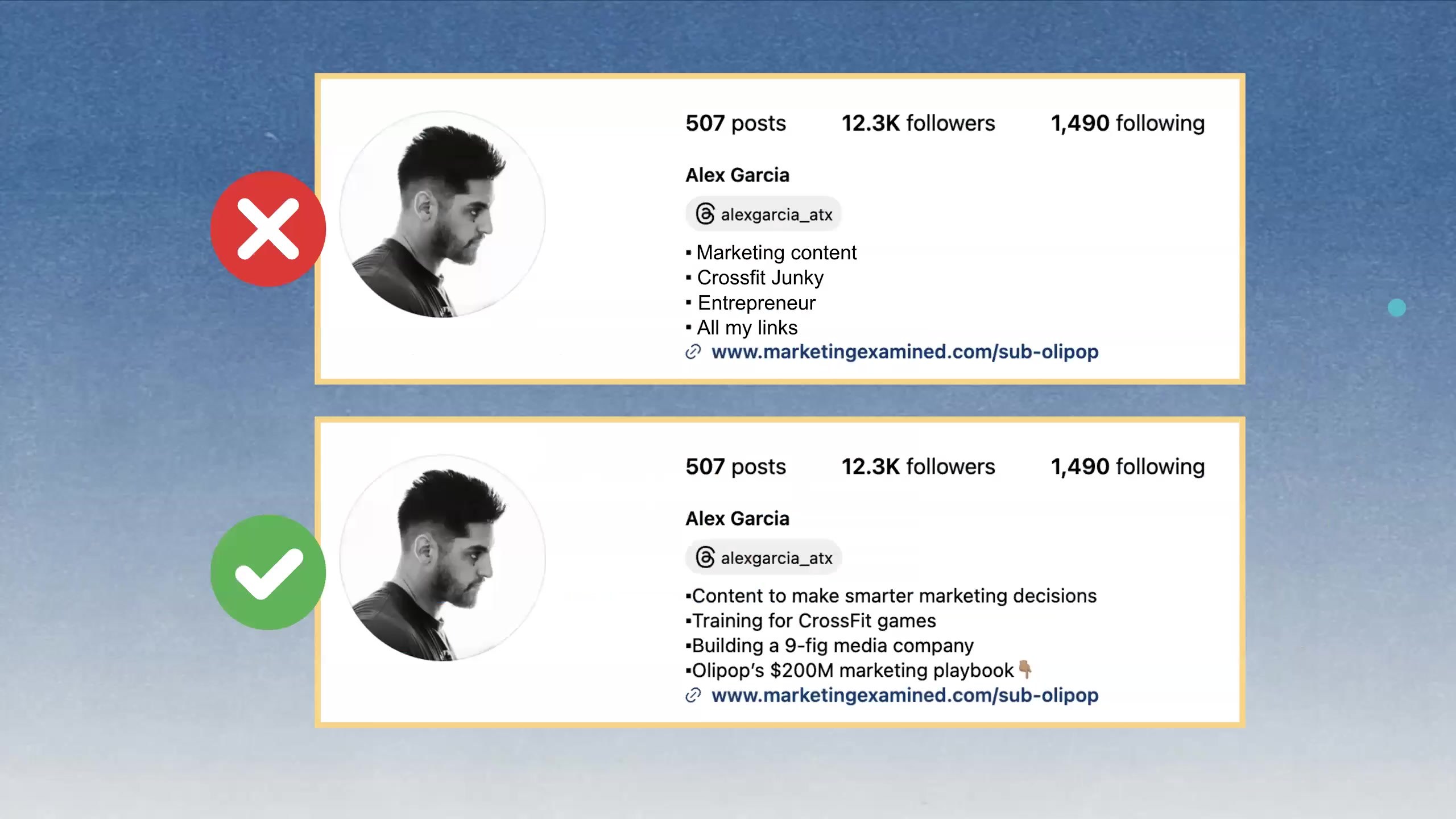
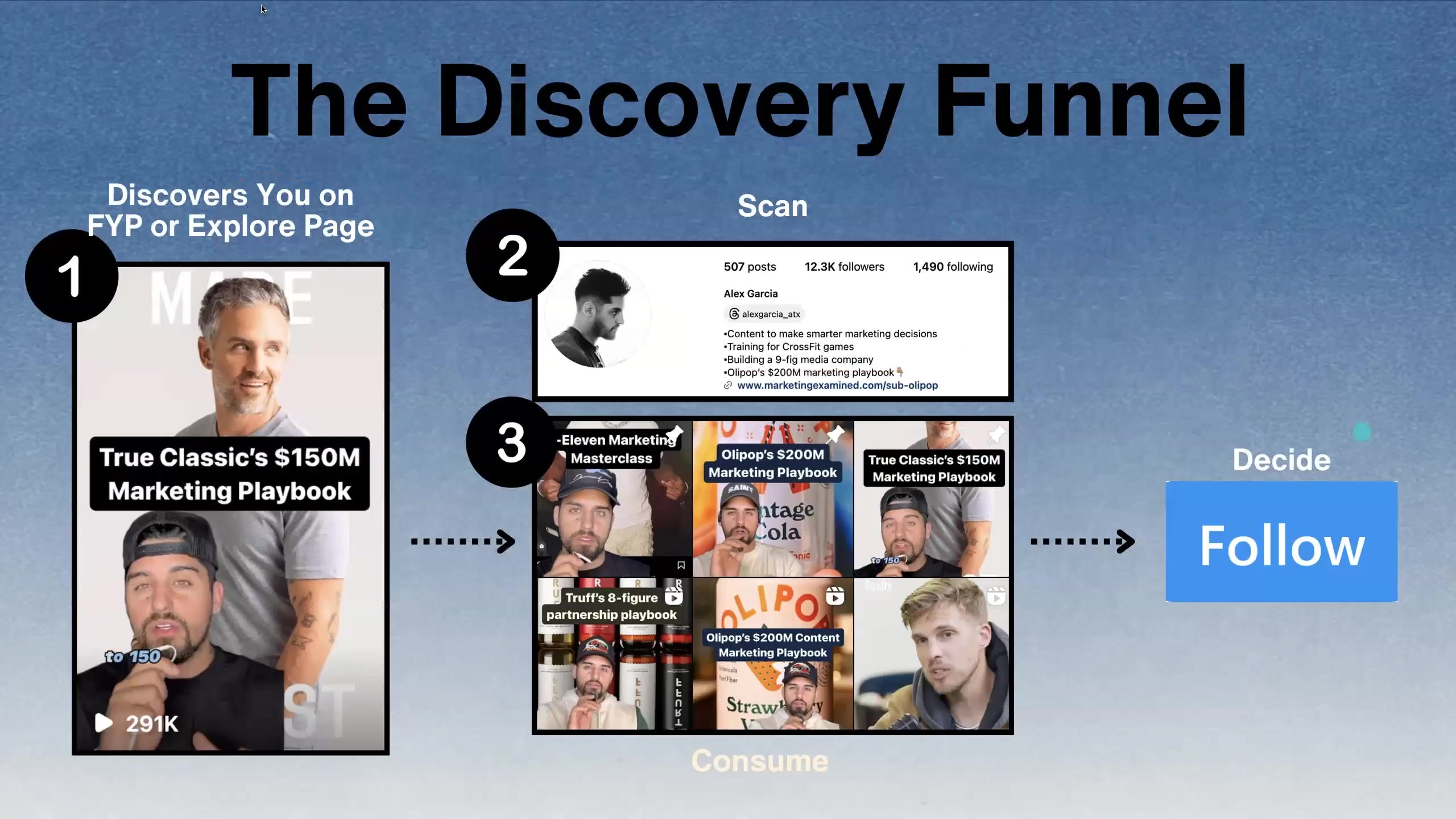
The source
Streams from johnny’s own Drive copy, about an hour. If it asks you to sign in, ask him to share the folder.
Read the full transcript (92 passages, auto-transcribed)
Colin: Oh, while we're waiting, actually, let's do some housekeeping. Some of y'all may have seen it posted in the Slack. Some of you may have gotten to it from inside the course. If you haven't, I'm sharing right now in the chat a link, an invite link to video database to create an account there. Go use this link specifically. to create your account. This is our hyper-curated reference database. Use that link. You'll get the creator to your account for free. And as we get into more and more videos, as we're looking for more inspo, more copy work, there is a wealth of it in there. It's an indispensable tool and highly suggest getting outside of your topic or niche as you dive in and look for stuff. Look for patterns and frameworks more than nail salons or hair care or whatever the case may be. All right. People are still moving in here. Let's give it a minute. Give it a minute. Guys, before we get into it, get some of your guys' one shots, 10 shots, your yaps ready to go. The last 30 minutes, we're going to be ripping through your content and giving live feedback on it. So if you want us to do that, get that ready to go eventually, you know a little bit into this after we review some content um we'll have you drop those in the chat and then we can start running through them we we're mixing things up this session as alex mentioned uh usually we have a guest this week um and we decided to push that off to the last two weeks like he said so we can just get straight into what you guys are working on in specifics you have. So we will still have guests as usual for three and four, but just you guys today, just our favorites today. Caitlin, yes, make an account. So to clarify, that link I just put in the chat is a invite link that will create you a creator tier account on there. You should do that. You'll also find it in the course content, but that is your place for references, inspo, examples, ideas, and a lot more. All right. Did Oren get connected again? You may be jumping in.
Oren: I think I'm on here, but it's just weird, so I'll be fully in there in a minute.
Colin: Yep, you're good.
Oren: Cool.
Colin: All right. So looking at our agenda for today, we are going to talk about bios, profiles, how to set yours up with Alex. Now that you're getting some eyeballs to it and people are landing on it, I'm going to go through post vitals, the pieces that we need to make sure every single post has to give it its best foot forward, which is surprisingly easy to forget. We're also going to touch on writing notes and probably just a note on following the briefs going forward. And then we're going to get into workshopping your content. So without further ado, Alex, let's dive into bios.
Alex: If you're ready, let's do it. So the one way or the thing I want you guys to think about when you think about bios and y'all see this, y'all see the deck, not my notes app.
Colin: Yep. We're up.
Alex: Cool. Cool. The one thing I want you to think about here is your bio, specifically how you write it is all about influencing someone to, to follow you. Right. And when you can compare this to something, I want you to compare it to the time you got hit with a meta ad and you landed on a landing page. And that landing page felt like it was not developed for the product that you clicked through to. That happens a lot of times. And so what we want to think about is think about your bio as the landing page that is going to convert the person who watched a video, loved the video, shared it, et cetera, clicked through, and now wants more of your content. That's how we want to be thinking about our profile setup and really the bio. So when we start writing things and we start optimizing our profile, we don't want to get lazy with it. We want to think through it through that lens of, okay, I'm trying to convert as many people as possible, so I have to write to be able to convert them. And so when we think about a good profile, a good profile really answers three questions. The first one being, why should I follow you, a.k.a. what value will you provide? right? You want to cement some kind of value. You want to set some kind of expectation around the content that you're going to be creating. The second one, what makes you different than any other X? Meaning there's going to be other creators that are in a similar category. There's going to be other brands in similar categories, et cetera. What's the thing that makes you extremely unique and basically positions you to be one of one? Then the third is why should I trust you or buy into you. And in this case, it's dependent on like if you're trying to get someone to fall along for your journey, or if you're trying to get them to purchase something and or take some kind of action, you want to solidify either that trust via social proof, or you want to hint at or like be very direct with the story that you're trying to get them to buy into, which we'll go through in a second. So again, when we look at the intersection of what a good bio is, It's these three things put together to be able to optimize and, again, convert the people that watch your videos. One, your value proposition. We're all making content to try to deliver as much value as possible to the person on the other end of it. That value could be entertainment. That value could be education. It spans across a wide variety of things. But at the end of the day, it's some kind of value proposition that you need to be known for and deliver over and over again. And you need to cement that, right? The way you're going to cement it is by cementing your identity, who you are, what you create content around, what you want people to expect from you. And that third part is either A, your story, or B, your social proof. At the intersection of all that is that good bio. And so when I look at it, this is an old bio that I had, but when I was trying to grow my page as fast as possible, this is what I used. it worked very well where that first line content to make smarter marketing decisions if i had a piece of content that went viral i wanted them to read that first line and know okay he's going to be doing more of this right because it's essentially getting almost like an automatic follow if i put a great video out they got a lot of good information from it and then that first line in my bio is telling them that i'm going to continue to do like this is all i'm going to do cool you know what i mean like that that is the goal the second uh line here at the time was training for for the CrossFit games. The reason I had that in there was I was leveraging that to differentiate myself from the other marketers, right? And the other content marketers, et cetera, that are also making marketing content because I was going to share that side of it. It wasn't going to be the majority of my content, but it's a lot easier to remember me as like, oh, the guy who also is training for X versus, yeah, he makes content as well. So you want to find that little angle that you can take, whether that's sharing something from your personal side, your hobbies, et cetera, that, again, makes you much more interesting and puts you in a race of one-on-one. The third part, building a nine-figure media company. I had at the time I was producing more vlogs, and so a lot of it was covering that side of it, building the nine-figure media company and sharing that side of it. And so I wanted people to, again, like buy into that, feel that experience, that same journey with me. And then at the bottom was the CTA. And the CTA for this was I had a lead magnet on the back end. And so that was the, you know, what the link in my bio at the time was. But if we look at, if we take what we just went over and then we look at, okay, what's the bad version of it and the version that the majority of people use? It's typically things like this, you know, and something you're going to hear us talk about and give you feedback on this entire 30 days is, hey, you've got to get more specific. You've got to get more specific with basically everything that you do. You write in a hook, get more specific. You write in your bio, get more specific. And so when we look at this bad version of it, again, it's what the majority of people are going to do. They're going to just put marketing content as their first bullet point just because they talk about marketing. They talk about marketing. But the matter of fact is, if I say marketing content here, you don't know if I'm talking about marketing news. You don't know if I'm talking about sports marketing, right? Like it's such a wide, wide range of topics that I could cover. But the second, like I, and there's no real, I'm not being crystal clear about the value that I'm going to provide on a day-to-day basis. But the second I say content and make smarter marketing decisions, right? Or if I just made, even if I said like content to make smarter or to make better content or better brand content or better, right? Like you just want to add this layer of specificity into that line so they know so you're talking exactly to the person on the other end who wants exactly what you're going to be creating second part or the second bullet point crossfit junkie versus training for crossfit games crossfit junkie is there's no story behind that it's it's almost reading as a hobby versus like having again a story behind something that people can can be a part of the same thing with like entrepreneur and the third bullet point entrepreneur point entrepreneurs is is a very broad and easy term to just put there there's no story behind it it's very different to say like oh i'm trying to do this thing or i'm on day 742 of doing this thing or i'm trying to pursue this this eight or nine figure goal etc adding those layers to these simple bullet to these simple bullet points they make the world of a difference because they it basically communicates the different layers of your profile that that people are going to be able to partake in. And then the last one, all my links versus one link in the bio. This is dependent on, you know, like some of you, if you have partnerships, you're going to have to have multiple links in the bio. But if you're trying to convert as high as possible, having one link in the bio works extremely well. If you have, you know, different offers, et cetera, then, you know, it's, you can always rotate, but, you know, it's typically a different game that you have to play. So the whole goal that we're trying to do here is we're trying to optimize for, quote, unquote, like the discovery funnel, which is basically the behavior behind people following you. So if you look at the image on the left, this is step one. People are going to discover you. A lot of you are going to have viral videos over the next three weeks, videos that get 50,000, 100,000, you know, million views. When you look at those, when you think about what's happening there, it's like somebody that's never seen your face, never seen your profile, is now consuming your content. You show up on their explore page, on their for you page, in their reels tab, et cetera. You made an amazing piece of content. They found it valuable. They're going to click through. And now they're going to scan, right? Like this goes back to the idea of the landing page. They are going to scan your content and make sure that this wasn't basically a fluke, right? Like you just didn't make one banger and the rest of your content is terrible. and the way they're going to be able to understand that the value expectation that you're setting is by your bio. They're going to scan your bio. They're going to look at what you're about. And then they're going to then decide to continue to consume some of your top content or your other content to see if it supports that and then follow and then end up following you and then or not following you. And that step in the middle, like step two of really telling the person who you are and what to expect from you is such a key factor in all of this. And so, you know, we'll touch on the homework in a bit, but a lot of the homework is going to be optimizing your profile. And I hate to use that buzzword or marketing term, but like that is what we're trying to do here. We're trying to make it and create it in a way that when you do have a video that gets 100,000 followers or sorry, 100,000 views, you're getting 1,000 followers, 2,000 followers from that, if not more. Like we want you to be converting as much as possible. And so another thing that you'll see within the course, and you'll get a link to this is in Kajabi, there's a link to a Notion page that has 50 different bios, probably 40 to 50 different bios that you could skim through, run through. Those bios are from either brands and or creators and all examples and good kind of playbooks for what you should write and how you should write it. So definitely take a look at that. We'll discuss the homework in a bit, but take this part seriously. You don't want a video to get 250,000 views and your bio literally is like cat mom. That's the last thing that you want to have happen here.
Oren: Unless the video is about being a cat mom, just to play devil's advocate.
Alex: Yeah, exactly. But that is the spiel on bios and profiles.
Colin: All right. About to jump into post vitals. let me share my own here cool um so like i said there are big key pieces of this when you sit down to make a video surely at some point you will forget a painfully obvious one of them we've all done it my very first actual i haven't told this story about my very first video that i made ever period I had to record three times because I didn't have a mic plugged in the first two times actually I spent like 10 hours of my life on that video it was incredible not a good way so we're going to run through these please throw any questions in the chat as we do around them but I think we're going to cover it all this is what we're looking at when we're looking at a video okay we've got the title captions description hashtags audio location mentions and tags first and foremost the title on your video, if played correctly, can serve as the cover image or thumbnail for your video on your profile. I would highly recommend doing this so that you don't need to go and create a graphic to then set a static image as such. Okay. So your, your title doubles as this below that typically in the middle of the screen. If you're doing talking head where your, your torso is higher up on the screen right below your chin or on your chest is a good location. You have your captions. This is pretty self-explanatory. A lot of times for my videos, I am not putting up my captions while I have the title on the screen. That's also because generally speaking, these things are redundant and I want somebody to be able to focus on what they're reading as they're watching. Again, pretty straightforward. Then we have the description. SEO on these platforms, particularly on TikTok is very, very real. It's doing a lot of reading from what's happening on your screen, from what's being said in your video, but the description obviously helps that cause as well. TikTok is going to let you do up to 2000 words. Don't worry about that. Get a couple of sentences, make sure to hit relevant keywords to your topic. Something I always mention here is if I'm doing a video about a golf factory, I could probably get away without saying the word golf, right? If I'm saying a factory for polos, I pretty much always am going to get the word golf in there, get polos in there, get the word factory in there instead of manufacturer, something that people are actually searching for when they're looking for related content. Don't overthink it. A couple of sentences is good. Descriptions, excuse me, hashtags, probably one of the greatest myths in all of content land. I think it's reasonable to say hashtags do not matter. That being said, you might as well throw a couple hashtags in there. All of these things serve as signals to the algo for who to show your stuff to, right? So if you're doing this, stuff like FYP or mega broad hashtags are not going to do you any favors. If there's a couple that are small and medium size that make a lot of sense for your video, it's no harm, no foul, and you might as well toss them in there. Do not overthink this. If you find yourself posting in Q&A, what hashtags should I use, I mean, by all means, ask any question you want, but you're overthinking it. Just find a couple that are relevant. Find a couple that are big creators that are big in your space or using, throw them in there and move it along. This is not going to change the outcome on any videos. Audio. Hang on. Let me make sure I let everybody in here. My bad. Thought I saw somebody joining. Audio. So some videos are just using your native audio. Some are using trending stuff. Anytime that you are using actual music and you can tag that audio in platform, again, as another signal for the algo to understand what your video is about, who might like your video, do it natively in the app. If you're doing a detailed edit to, I'm not feeling sharp enough this evening to mention something. If you're doing a detailed edit to Lil Wayne's Fireman and you got cuts on beat and everything, I would export that, bring it in, add Lil Wayne's Fireman to the video in Instagram or in TikTok, and then take the video, take the volume down to zero just to add that meta information for the platform. Again, it's probably going to pick it up anyway. There's just another way to make sure that it does. And if we haven't covered it enough, all of these things, including the song, are little hints to the algo about what might be in your video and who might like watching your video, who it should try showing it to. Next, we have mentions and tags. These are pretty self-explanatory, but they're slightly different on platforms. On TikTok, you just have mentions. This is literally the username is in the copy of your description, right? It's in line. on Instagram, you can do that, or you can add a tag, which just tags them in the post, even if you don't literally mention them in it. In either case, you should only do this with an account that is like truly organic. If your video is about another account, it's about a brand, it's about something else like this. It makes sense and it is organic to tag that account. Do not just tag 20 accounts of people that you want to see your video and spam their mentions with it. That is not helpful. When you do something intentional and meaningful, again, it's another little sliver for the algo to try and understand and push your video to. Our last one here is location. Location is a fun one. If you are doing local content, tag it like crazy. You can tag the neighborhood, you can tag the city, whatever works. Do not miss it. Again, it will pick it up without the tag, but do the tagging. If you are making content about a location, right? I'm sitting in Portland, but I'm making content about my trip to Paris. I could tag Paris. I could tag the cheese shop in Paris that I bought the knife at. I'm referencing a very obscure video from deep in our old references. But do not tag in organically, right? Again, do not spam your location. Use all of these things organically so the algo can make the most of them. All right, moving on from post vitals. And I just can't reiterate enough. You will screw up and totally forget captions. Don't sweat it. But come back and think of this like a checklist every time you go live just to make sure you've got the basics. All right. Next up, as we get into this and as we make more videos, we have a very common piece of feedback that we're going to cover right now. Notes on words, right? I would think of short form as efficient communication. What I want us to think about when we're writing these scripts, recording these yaps is efficiency. Okay. When you write a script, especially if you're new to this, you'll be able to write a video script, pull it up and delete 30 to 40% of the words and have the exact same video. It'll be very disappointing. It'll be confusing for a lot of us, right? The exact same video coming out the other end. And that is a very good exercise. I still do that on videos. Okay. It's going to depend on your delivery and everybody's different. For me, 130 words is around a 40 second video, which is what I'm going for a lot of the time. If you sit down and write a 250 word script, that is way too long, right? Here's an example of how we cut a script down without losing any context or any meaning. This is a real script from somebody in Cut30 long ago. All right, the before. This is my Black Friday ads playbook as someone who spent $100 million with Meta. The three most important parts of the playbook are your offer, your creative, and your landing pages. All right? If we go and cut this down, we end with, I've spent $100 million on Meta. Here's my Black Friday playbook. Let's talk offer, creative, and landing pages. That is the exact same statement. It is a little bit more than half of the words. It is exactly the same. We lost nothing, right? It is extremely efficient. In terms of what we actually did here, ads is implied by anyone who knows what you're talking about with Metaspend knows that you're talking about ads. You don't need to say the word redundant over and over again. When you introduce that you're talking about a playbook, you don't need to mention that again. And that's a lot of words, two syllables. And then introducing the three things as important is a waste of air because, of course, why would we be using them in our hook? Why would we be making a video about them if they weren't important, right? And then literally the word you're like, you just don't need to say it every time. Right. And in slimming this down like this, we literally have the same statement with half the words. If you take this approach to your scripts before you record, you will be shocked by how much punchier the videos end up being. On that note, we're going to hit homework. Oren's going to show you a couple of examples of the video formats that we're doing in the homework. And then we're going to just going to open up workshopping with some videos that we've already selected. All right. Week two homework. First and foremost, optimize your profile. Alex mentioned there is a Notion library of a ton of good examples, whether your brand, personal brand or somewhere in between. There's a lot of examples there. It is linked in the course content. It is an external Notion page, but it's linked in the content. So you're not like looking for Notion access or anything. All right. Optimize your bio and then post it in your track channel. Get some feedback. See what other people think, so on and so forth. We'll get feedback on everybody that shares their new bio. I especially it's especially useful to show your old one as well, just so we can understand where you came from. Homework number two is to start shipping. We want to see a minimum of three videos this week. Critically, there is no more uploading. So there's no more uploading for feedback before. We are only shipping videos. We're posting videos this week, getting feedback, taking that and iterating on the next ones. And our videos this week, at least two of those three are going to be, one's a 10 shot, one's a graphic yap. Orin's going to go through those. But first, the last point on here is important. It is time if you are not already to start engaging with each other, right? If any of you are familiar with the concept of an engagement pod. That's not what this is. But if you go into video sharing, throw your video up there for feedback and dive in and see what your other people are working on. Click on their videos, go hit a like, go hit a comment, right? All of this is about momentum. And whether it's your first thousand views or the first thousand followers, those are the hardest. And you guys all have a huge advantage being doing this with a bunch of other people that you can jump in the mix with and get those interactions, get that engagement going, so on and so forth. thank you for sharing that link in the comments there um or and you want to show us some 10 shots and uh and graphic gaps let's go
Oren: all right brad brad brad uh all right we're gonna pop into it i want to talk about the homework here this week one quick note about this uh that that's important is that we structure cut 30 very specifically so you learned one shots the first week and now you're gonna learn 10 shots we did yaps the first week now we're gonna do graphic gaps stuff builds on each other. And if you're worried about like strategy and what do I do and top of funnel and pillars and all that, we begin to hit that next week and the week after once you've tapped into some of these basics. So that's all coming. So this week we're going to build on what we did last week. Let me share my screen. And we are going to start with 10 shots. So you see the concept of a one-shot that is self-explanatory one-shot. But how do you make those more dynamic? Instead of having one shot you have multiple you cut up multiple things and so before I play one I want to give some quick call outs here for a 10 shot video we're still looking at the same rough time range I would not make these longer than maybe 12 seconds we'd be really shooting for that 5 second to 12 second zone and just using more shots I would say kind of a minimum of 5 shoot for 10 and then you're looking now importantly you don't just need to have one idea in them you know on a one shot you basically get that one wall of text you can still do that on a 10 shot and just have more behind it, but you could also put basically two pieces of text where you have a lead and an answer. So an example of that is a travel video I did in Florence. So POV, instead of traveling to Florence, I'm sorry, instead of buying luxury, you travel and do it yourself. And then I list out a bunch of links that people can say at the end of the video. So I've got about 10 shots behind it here. And those two-part videos where you introduce your concept, you show some cool footage, you wait, and then you give people a resolution works super well because it catches attention, it keeps them hooked visually, and then it gives them something to save. This is how I want you to think about your content. How do I hook with something? And then how do I make it valuable enough that they save it or share it on the end? Alex has a few of these styles as well, where he talks about like doing like brand social content like this. You could do the same thing if you're, you know, doing work in your office or you're at a client site and you're giving them tips for Google ads or accounting or whatever that is. You can use that here and get some good So that is a 10 shot. But importantly, we also want to talk about graphic yaps. So the yap, you may have noticed, it's a little hard to keep attention when you're just talking. We want you to give it a shot so you can see that it's a challenge. You can see what works and doesn't. But the format that we do the best with in Cut30 and the most people succeed with is this graphic yap where you are talking and a lot of people are just talking on an iPhone like we did in the yap, but you put graphics on screen. And we have a few styles. This is Jules. She is a Cut30 grad. She makes a lot of content about living in Indonesia and she does what we call a chaotic graphic yap. And we will post links to all of these in Slack. But all she's doing is she's putting graphics over while she talks. They're over her face. There's no design. It doesn't matter. She's telling a compelling story. And it just happens to be you can also follow along with a graphic. A good rule of thumb for this is maybe one graphic for roughly every two to three seconds of the video. Just allows you to have a flow that goes along with it. And this is the easiest one to do is just put it on screen. Another Cup 30 grad who did a slightly more organized one is Miko. So in this you will see he has positioned himself to give space above his head to put his graph here and the graphic above there. I highly recommend this, especially if you watch that first video and you're type A and you're like, Jesus, I can't watch that. Then get yourself organized. Literally plan how you frame. know you're going to put your captions above your head and you leave a space for images. And so in this video, he's flipped through images as he goes through and is able to tell stories. So here he's telling the story about the course, uh, beer and their history of bootlegging. This is an awesome format. He is that they're just pulling graphics from Pinterest, Google, Cosmos, stuff like that. Uh, if you're doing content for a brand, you may have a lot of your own content on there. Uh, if you want to have your royalty free stock from places like Unsplash, uh, there's like a lot of places you can pull graphic stuff from when I'm doing brand I pay for photos from places like Death to Stock and Envato. Any questions you have about that, you can throw it in Q and A. But most people are just pulling from Google and Pinterest. A third style, actually, you know, another, this is another, another cutthroat guy to do a similar where she's kind of giving the space above her head to be able to walk through it and do it kind of for her account as well. She has a little more of a full body. We will put these examples in there, copy the framing of these examples for these, these graphic apps, and you will find it really easy to be able to, to put it together. And she's doing a combination, right? She had a full screen, a half screen. And if you want to go more produced, this is the style that I do now for a lot of videos as well. This is my video from today where I'm doing a full screen image because I just like how it looks to do a full screen image. It takes some more time. We do these in Canva. Just keep dragging images to make sure they're fully resized to a canvas and then put them over it. So if you do want to get a little bit more produced and expressive, the full screen is another style you can do as well. If you do have a background in visuals or you really like cool design, this is an opportunity to flex. My friend Sam does this and she's doing like cool overlays. She's putting a lot of time into these edits. You don't have to do that by any means. But if you do, you're excited by that kind of stuff. You're creative and you like it. Feel free to flex and do something cool. This is a great style for it. But what we want you to do this week is to try that graphic yap format. We have a bunch of examples. You can use the same hooks you will do for yaps. I will post stuff in there tonight. You have even more options. We'll share some others throughout the week. You can find some in video database that Colin shared. But basically say, how am I going to tell the story? And if I'm doing a minute-long story, I'm going to get 20 images or so that I'm going to put over it. You're going to be doing that as your other homework this week. And then for your third video, you can do, again, much like your copy work, whatever it is that you want to hit. And so without further ado, I think we can get into some examples and Q&A. So we're going to start with a couple that we've pulled from the wins that we want to shout out and review. And then as we get rolling here, if you got a video you want us to talk about live and direct, throw it in the chat. Alex, you got?
Alex: Yep, pulling them up now. So we're going to go through a couple here. Let me. All right. So this is what we call a listicle one-shot video. This is a one-shot video that got, I think it was 40,000, 50,000 views is one of their top performing videos. Overall, very good video. There's ways that we can make this better. So an example, let me just move this out of the way. 10 mistakes you're making with your furniture. So we could basically add a qualifier here. 10 mistakes you're making with your furniture if you're trying to like reorganize your house, if you're trying to turn it into this type of interior design, right?
Coach: You're in a small apartment.
Alex: Exactly. Like you just want to add some layer of specificity there into that. The next thing we would do here is probably want to fix the shot. Right now, like all the body of the text is taken up like the majority of the screen, which in some cases is fine, but there's ways of doing this where it could still kind of be like a one shot, playing one shot or possibly 10 shot territory where if you wanted it to be a one shot, you could have the hook as the first clip, the second clip is then gonna be your listicle or you could kind of do a listicle in sets of three and just have different shots. You could do it where it's 10 mistakes you're making and it'd be one shot, then like three, four transition shots reveal the listicle versus again, Like this, this is this, um, the furniture here is set up in a cool way. She's taking aesthetic shots. They're not really seeing the light of day because of the text overall. It is a good video. Got 40,000 views. Like that is a, that is a phenomenal video, especially for, um, anybody that hasn't been making content. But again, we can always make it, we can always make it better.
Coach: Well, while you pull up that next one, I just want to call out, like, even if you don't touch the text and we didn't do the solid white background and and and you change the line break so it it takes up two-thirds of the space you're like much better off go ahead sorry
Alex: yep so can you guys see this this uh you can't call yourself a performative male
Coach: yep oh i remember this one this one
Alex: yeah so this one got i think well over a million views um this is very similar to a one shot you can't call yourself a performative male until you try seated yoga on your international flight, right? This is in many ways, just cutting up one to two scenes into, into this 10, 12 second video. The text on screen is like, so, so good, right? Cause it's playing into culture. It's playing into things that are relevant in like kind of the fitness space and longevity space. And then on top of that, you know, we talked about this actively where you want your, your, your videos and your clips to match and bring together or sorry match and bring to life the text that you put on screen so there's one you know this video would have probably got a hundred thousand views hundred maybe not even if he would have just shown that you know like shown the the yoga on on the airplane screen but the fact that he did all of this and he he filmed these extra steps is what made this a you know an absolute banger so overall very very good video Let me pull this one up as well. All right, so this one's not even a one-shot, but what I want to show is, like, this is a great example of if you just tap into culture, right, and you're able to, like, take something and package it and position it in a smart way, it can pop, right? This is a bookstore, and there's all this, you know, to talk about building out data centers. and they just took they took a singular image when even like you know for some singular images don't work well for some they do and they just put this as a data center on top the reason i put this in here is if they would have the way that you can make this this has 10 000 likes so probably anywhere from like 200 to 350 000 views if this would have just been a shot wide angle shot of like walking in the library or walking into the bookstore with cleaner text that said this is a data center this would have got millions of views and it still can. Right. And, but this is how I want you guys to think about, you know, you should be optimizing the, either like the aesthetic that you're leaning into the angle or the action of, of these one shot and 10 shot videos. And then the text on screen obviously plays a huge, huge part of it. This is just a great way of basically spinning something and making it their own based on something that it is extremely culturally relevant. Okay. Let's pull some 10 shot videos. while that's loading oh god no one very good this is another video that got um i think it was like in 500 000 views if not if not more where again it's like understanding cultural relevant uh cultural references in other categories and then bringing them into your space so this is his sephora there's so many videos about going into sephora that that pop for for women that is known from like if you look at like the the like the boyfriend or the husband understands that pov so by being able to spin that and be like this is his sephora um or the i think the wife has been in it like basically being able to spin it and turn into like this is his uh his sephora it plays into two demographics it plays into into the female that understands this and like has has some kind of relatable experience like this and then it also plays into the guy that's like yes this is and wants to share with all their friends or share it with his wife or girlfriend etc right great and but i also want you to see the a few things the shot selection is amazing like he's not or she's not like focusing on the tires and like super detailed shots the majority of these shots are beautiful wide-angle shots that show the entire aesthetic right so they're and they're leveraging that and that's smart to leverage it where they could just be focused on here and a lot of the times people think oh you have to focus on the product where majority of the case a lot of times like leveraging the wide angle shot beautiful aesthetic beautiful backgrounds um and adding in motion right like there's another thing to pay attention to there's constant motion there's constant cuts the pacing of this is very good where certain things get cut like this coming into screen at a perfect time like these are all the small things you got to pay attention to especially either a when you're studying content or b when you're when you're um making your content um this is another example that i i like uh the next two examples are are similar
Coach: hey alex can you go to the comments on that sephora video i'm curious if that get if that got pushed to dudes or or women
Alex: i think it's going to be a good yeah healthy mix of the two but yes right
Coach: i mean full mike you'd asked a question i was curious
Alex: right girls here his mine
Coach: yeah it's both yeah it's a good it's a good
Alex: yeah there's it's a good mix um so this was interesting just to show range here where this is a tension video but it's purely pulling um images and and there's a world where like if if you want to get into curation as like your top of funnel this is a great way of of doing so architecture plus tennis and it's basically a 10 shot video of nothing but but photos um that they're able to leverage and this this is a winning format whoops this is a winning format um for them that they actually do pretty often where the architecture plus tennis, this was another winner for them that got like 30,000, 40,000 views. And again, there's ways of doing this. You could go into, and that's the reason I show this is you go into some interior design store, you could go into some studio and basically recreate this in many ways. Let's pull this one before we get into y'all's. Y'all could start dropping y'all's videos that you want workshopped in the comments and we're going to start.
Coach: We got four of them in there if we scroll up.
Alex: So beautiful. Um, the reason I want to show this never do these is it basically plays in almost like one shot in 10 shot, uh, territory. Um, never do these three exercises unless you want to be a freak athlete. This open, like the reason this pops is this opens a, an amazing curiosity gap, right? We're like, okay, what are those? Like, of course I want to maybe be a freak athlete. I need to know what those three exercises are, but you could take this format and you could take this text and basically spin it into whatever category uh never buy these three candles if you want your house to to smell like x uh never buy this furniture if you want your house to be the the comfy or the the cozy's house and on the block right like there's so many ways to to spin this and then basically you then just reveal the exercises with text on screen right it's such an easy way um to and and they put i think they did via on top of it but it's literally they don't even need this they could literally just have the all they're saying is with the text that's on on screen this is a a 10 shot video you know like it plays in that that one shot 10 shot territory and it's such an easy format to do i could do this for content you know like never follow these three rules if you want to blow up on social right or make banger content etc like we can make this about 10 shots uh like we can make a 10 shot about 10 shots like there's there's so many ways to be able to skin all of this. So let's start diving into some of y'all's videos here.
Oren: Let me start. Alex, if you scroll back a minute. Yeah. I never trust my ability to share a video. So if you can.
Alex: I got it.
Oren: Okay, Colin, you answered those questions.
Alex: Cool, cool, cool, cool, cool. Okay, let me see. Okay, cool, cool. We're right here.
Oren: Fiona's the first one if we take them in order.
Alex: Yeah, that's what I was trying to make sure. let me share my screen
Coach: dan asked do you think follow for more is a good idea uh dan early on i would never put a call to action at the end um because it's it's right like watch time is such a big piece of this equation and um it just is using space once you get some momentum once you can make a great video. When you're telling a compelling story that lends itself to like what comes next, then it can definitely work out well and drive follows much more than not saying it.
Alex: Yep. Okay. So let's look at this first video. Okay. So
Video: I'm building a golf brand by word of mouth, no investor cash, no giant media by the advertise with just golfers saying, Hey, have you seen this brand? If you're one of those people thanks for spreading the word
Alex: so i think like the bigger thing i would do here
Coach: well let's watch the whole thing sorry
Alex: okay fiona's in 10 shot territory here she's in 10 shot territory overall it's a it's a good video solid the thing that i would do is i wouldn't start with the product shot that's that's probably the biggest thing i would start in kind of like this territory first and then and with you having having the product in in hand for some the second they see product in hand they're gonna it's gonna feel at like an ad and so i would kind of just reverse the order of the shots and then the second thing that you can you can do here is i'm building a golf brand by word of mouth um i would probably start with some milestone like i've gotten to x amount of customers potentially like if you're open talking about revenue just by word of mouth and like using those numbers as as a hook um no investor cash no giant media buy it advertised with just golfers saying hey have you seen this brand if you're one of those people thanks for spreading the word like just just putting that milestone in there that again
Oren: yeah like like like doing like uh i just like the things you mentioned but like I just sold out drop X, no investor cash, no giant media. Right. And like, and like setting the stage for like the bop, bop, bop, bop, bop, I think would work well. Also just like a technical thing, make your tech smaller. I know that's feedback. I gave a bunch on one shots. Um, it always feels like it's the right size when your video is half your, half your screen. Right. But then when that video is full screen on my phone, like that text is bigger than what you would typically see i'll just make it smaller
Colin: but we got text sorry would y'all direct that a little better or leave it
Oren: say it again
Colin: would you art direct that text a little better or leave it just standard
Oren: standard as a motherfucker pardon me yeah i would center it and put it higher so it's more readable so it's not over the pattern potentially like use the negative space well but i wouldn't like crazier on the fonts or anything like as far as we would generally recommend going is what you saw in the video Alex shared where they're using instrument serif in edits but it's like recognizable fonts mean people are going to be able to read it quicker and faster
Alex: we so generally alleviates a lot of problems but yeah actually since I'm putting this or you're cutting or it's cut now for me but but I think to to go along with that you will notice that all like pretty much all the examples we give you the brief on making one shot everything is use the basic sans serif classic like in tiktok it's called classic and instagram it's called i can't remember right but use the basic and it's because this is what people are used to seeing right um it we recommend it for a reason um a lot of people on the brand side want to do their fancy brand kit and it just doesn't perform it can it's not impossible but uphill battle i i forgot who it was but somebody that ran through cut 30 and one of our or maybe it was jason um he posted something on his story earlier today where he like tried three different title title hook variations one that was extremely fancy one that was um played in the in the territory of kind of like native and and still nice and then another that was just native and he ran them all as trial reels and the one that was just native i think it was like a 6x performer or 6x outlier in comparison to and i get it like we're all in that space we want that we want it to like look beautiful and i i totally feel you i struggle with it um myself but should i rather take a million views over a hundred thousand sometimes all right who got next all right cool so we're bringing in
Coach: yep
Alex: all right
Video: there's a secret hidden in claude's output so let me play this down in the water right now and nobody can tell it's even going on they can spot anything it wrote anywhere on the internet it's called watermarking and the way these things actually work it's kind of brilliant see in any sentence there's infinite ways you can say the same thing so they split the dictionary and they nudge everything it says to one side let's call it the green side over a few paragraphs and everything keeps showing up green that's not luck that's a signature so why are they even doing this officially it's for some EU law about labeling the AI content but think about what it's actually for the internet was drowning in AI tests that's you that's me that's everybody and these models will break down and they train on too much of their own slot but they can't just filter it out nobody can tell anymore not even the company that made it and you'll see pretty soon all the big foundation model companies will follow suit because the only way to tell if something's a guy generated is that the ai something crazy is happening with this
Oren: is a really solid video i think i think i gave you feedback on your script jimmy but i hadn't seen the actual video this is really solid my main feedback points are i think every ai video i see is like a a secret thing right and that's tough because like there's a lot of crazy stuff happened so fair enough um but like it it feels like a hook i've seen before the other thing and i don't know exactly how this watermarking works it feels like there's some insane nerddom to expand upon and how the watermarking works which sounds super interesting to me um and i feel like you touched on it but like maybe there was more there um uh yeah but also even the topic like it can only get so interesting with that like it's cool to do a news video but i don't think there's any like it only goes so far so i don't think i think you made a great video for what the topic is but i don't know if there's that much more there surely because it's just like okay it's not no one's sharing it with a hundred other people it's not going to change anyone's life just because it's kind of like news of it it's a headline last thing is i think uh man in gray room is like worst case scenario for like environment you're shooting in right and like you actually make this work for what it is but i would imagine you can just like do better with like what else is on screen what is behind you
Alex: The last thing I'll add to it is I think if you are going to do something relevant to AI, you have to figure out an interesting way of presenting it and packaging it, right? If everyone kind of does that, like there's this secret and there's talking head, then maybe you're the person that's going to bring over kind of from like the marketing branding space where, you know, you have your laptop flipped over and you're in the space bar and like that's new in that space. or you're going to do some kind of explainer video on the whiteboard or right like you you have to figure out the way to present it and maybe even it's playing into like a some kind of personality you're like you're going to develop some kind of of of character right it's it's um you know you're you're going to be carl the claw like you have to figure out like what you're going to do that's something extra yes you need something over the top that or maybe not over the top but something that, again, that makes it stand out.
Colin: To be clear. A great example of this for people who want to look at it is LibreMag, L-I-B-E-R. That guy basically does news in sort of like the high-end travel and luxury space, but he has a really unique kind of set and he's a really unique edit format. And if you're in a saturated space, so for instance, like you want to talk about new AI features, most saturated space online, right? If you're talking about like branding and marketing ideas, very saturated. it's like okay you know take one or two of these things like how do i add that character add that one dimension to it but um great start though jimmy
Oren: yes yeah absolutely again for that topic you're doing about as good as you can you know so i would uh i'd be stoked and be looking at how do you have more unique like a more unique approach as you what are they called libermag it's how do you spell that i can never remember
Colin: it's like libermag l-i-b-e-r i'll put it in the chat just yeah we can move on to the next one i'll hit it there for people to want to look at it
Video: positive affirmations vision boards manifestation journals they all work but they don't work in the way you think the real way you manifest you guys is you bring your boy into every single day especially when you're met with challenges and uncomfortable situations that positivity in the face of challenge is what's going to raise your vibration and actually align you with the higher self and the dream life that you want i'm not saying don't focus on the foundational work or the preparation of the garden if you're over the age of 18 and you're living in society then you have plenty of things to tend to in your garden you have plenty of experiences that you bring joy to
Oren: it just dropped from your screen share alex but weird okay yo so i think i can't remember his name was that sean uh yeah i think your energy and delivery is great uh uh my like without hearing every single word here. Like your energy and delivery is great. I want you to wipe off the lens on your, on your phone's camera. Cause it feels smudgy. Um, but I think you, this is a video that it fits into that. Like anybody can make this video. What's Sean's version of this video. What's Sean's unique lens. Um, and, and that could be, you know, you can do that with stories. You can do that with like your setup and how you're talking about it. You've got a notebook in your hand. Um, but like the energy and delivery is great. Like there's, there's a lot, a lot of good there. Okay.
Alex: That was going to be my, my bad, my similar take is, is either a, there has to be some kind of like protocol to be able to, to do that on a day-to-day basis. And maybe there's some kind of protocol that changed your life. And you have your story that you could intertwine into this on top of, Hey, this is exactly how I did it. That, that, you know, helped change my life. That's what's missing in here versus kind of staying in this land where, you're saying like you're you're telling something that that is very important but at the same time you're not packaging it in a way where people are extracting the importance right and that's just that's just coming down to like how the really like the bullet points that you're putting in that content all right is this the right video because this has 109 000 views or 109 000 likes
Student: uh i'm sorry but i'm the one who um brought the video here this is not my video this is um a video i'm taking for as inspiration what i needed was feedback on it to know whether or not I can use it because I feel like paid ads were run on the video, but I can't tell per se. And the second question I have is about the framing of the person. I would really love to do this, but currently I only have like my wired earphone camera, mic. So I don't think I'll be able to get this framing exactly. So what do you think I should do in that situation?
Alex: Okay, let me watch the video.
Video: it's easy for a family to live together but rarely be together one non-negotiable when we design spaces for clients is to think about how the space will facilitate connection this is psychology design episode 38 spaces shape how you're
Alex: cool i mean looking at it it's it's a green screen video it's just she has her lighting dialed in in her company like her the way she's shooting it dialed in you know so like even if you just have your your um you know your wired headphones that's perfectly fine that but the things you have to pay attention to is how you're lit up right like don't have don't be shooting with with a window behind you shoot either in front of a window have a light um have separation from you and the wall wear something that separates you from the wall like if i'm i would act like if if i'm recording a green screen where I'm at right now, I wouldn't wear like a light shirt or a white shirt or anything like that because it's going to blend in. And so when I do the green screen, it's not going to be as clean. On top of that, they, you know, she, she's on episode 38. So obviously it's working well for her. She's figured out some, you know, what we'll talk about later on, but a signature series where I forget exactly what it's called, but something about recreating spaces or something along those lines. Like that is what, what she owns. There's, I think the interesting thing that she does i'd have to watch the remainder of them is that i'm guessing this is like her you know hook that she owns where she goes split screen that like is almost like contrast right yeah yeah it's like the contrast between like her on somebody on the phone versus like family probably spending time together uh then like a a full screen shot and then she introduces the series psychology of design and then goes into it right like those are the things that you should you should 100 pay attention to from like uh editing pacing and kind of packaging play and then you know we talked about last week doing copy work if you want to do a video like this transcribe it write it out word for word until you basically it becomes like muscle memory as to what made this you know this is this probably a um you know two to three million view video if not more like write it out until you understand what made it that and then go into it
Student: but can you make this
Alex: yeah of course it is it really
Oren: um but you you do have to think too like this is she's at the point where like this is muscle memory and then this is a skill like she she has this dialed in her first part of the hook yeah right she can be softer on her hook because people are used to seeing her but but like this is a green screen video this is straightforward right i i'll record my green screen videos like this but like if i put it on a tripod right here like that's that's what she's doing she may be shooting a program but green screen video if your wire is long enough like like if you want to be away and wider then just do that to whatever extent your wired mic will let you and and you're in business
Alex: 100
Colin: all right we want to hit homework before we log off
Alex: yeah is there one more uh let me see sorry say that one again
Colin: do anushka's uh just at the bottom here
Alex: okay all right cool hey if we have something here
Coach: yep let's do it
Colin: yo while you pull that up Teddy has a question about Oren's bio early on. And I think it's a good time to mention, which we kind of breezed over like, yo, your bio where you're experimenting right now, you will be experimenting for a long time. Your bio ends up being kind of a proxy of like, what you are the stage of your brand or the thing, the content you're experimenting with right exactly now. So like, like, I don't know what Oren's bio was, you know, two and a half years ago but like like his bio i guarantee has evolved uh until he landed on the internet's creative director
Oren: it was the same exact i had that like six months in it's the same exact bio internet's creative director sign up for my brand strategy newsletter i've only added the job
Coach: orin stumbled upon the hottest personal direction on the planet and that's been
Oren: oh yeah honestly my manager came up with it but that's a long story but yeah
Alex: but again so it's like you have one good line but then the call to action right it's like get people to the email list um but yeah like you'll get to Colin's point you will find it along the way but the best thing you could possibly do is just follow that exact formula of like why are why is this interesting what do I do what are you going to get from this account what call the action do you want me to take you know
Coach: most people don't know why to follow you like what are you going to give them with your content if you just tell them that they're gonna be like that sounds great and they're gonna follow
Colin: do we get that one pulled up Alex
Alex: yeah you can't see my screen
Coach: I could be yeah now
Alex: okay
Coach: I did have a cool thought though
Alex: there we go
Video: full-time creator is basically just going on random side quests because tell me why I have a selfie with Mahal and people of Mysore and Adam Moseri the CEO of Instagram and the former CTO of OpenAI and the general consul of Japan and Jail Sheep El-Aman And all of these were for work technically, even though I was just having fun doing the random side quest anyway. But yeah, if you want to know what these specific side quests were, let me know. I guess I could make videos just talking about them. Having a job as a full-time creator is basically just good.
Alex: I would take the angle of like how to leverage side quests to meet these people or what those side quests were to meet these people. Like you have, it's a winning, it's like, this is a very casual video that you did and it ripped, right? Like it's performing exceptionally well. There is proof in the pudding here that you can go turn this into basically a series for yourself about like leveraging side quests to meet niche celebrities. And it would pop. There's so many ways that you could, sorry, Colin. There's so many ways you can, like you could do the vlog version of it where I'm going to this event, trying to meet this person. Let's see if we can make it happen kind of angle, which would work really, really well. There's some creators that like will go to basketball events to try to see if they can take a picture of like LeBron James or something. And, you know, and they turned it into like this two, three part story. That guy like, what's his name? Simon, not Simon. The guy that's like, do you have a dream? He does that really often with people where he's like, I'm going to see if Floyd Mayweather can help me fund a dream or something along those lines. And he goes to an event, tries to get in front of that person. There's so many angles you could take with this. That's really, really interesting.
Colin: I would also say we'll talk more about funnel later, but like this video doesn't need to rip. It can just be like incredible social proof for your followers who already follow you to be like, damn, like she's really, really out here. Not every video needs to go crazy to serve a purpose. And I think it's that. It's a fun one to just like do a little flex and talk about why it doesn't need to go to the moon.
Student: all right yeah I had like two ideas with that like one was just totally a flex to just kind of establish some credibility of just like yeah I get invited to cool things and also for like people like brand managers to be like okay like we can trust her to kind of invite her for more cool events and I think the second thing I'm trying to do is just introduce this word side quest a bit more in my content so either when I do go for an event like I can be like oh yeah like this is a standard thing I do or now that I I mean I don't have a lot of footage from those events because I wasn't thinking of that back then so I was like can I retroactively like maybe from this video pick up a comment where someone's like oh how did you meet this person and create like a real with like the sharing comment feature and be like okay yeah by the way made this video let me talk about what happened over here
Coach: yeah no that totally makes sense
Student: yeah okay awesome thank you
Colin: You bet. All right, y'all. So our homework for this next week is rewrite your bio, share that in your track channel for feedback, make three videos, no uploads, only posting published links to one of those is going to be a 10 shot. One of those is going to be a graphic gap, uh, ample references, examples, um, and details on that in the content. Um, and then Hang on, Mikey. I just got distracted by that. What was the last homework? Oh, engage. Go be friends on the internet with everybody that is in here. Go like, go comment, so on and so forth. Office hours are going to be eight o'clock on Friday. I believe we've got invites out for those as well. If there are any deviations from those with the coach that's actually doing them, they'll be posted in Slack in advance. Sometimes those flex by 15 or 30 minutes. Yeah, I miss anything, gents?
Alex: Nope, nothing on that side. All right. Keep posting. Keep getting reps up. The next three weeks are going to be big on the growth side of it, especially now that you have to be posting to get feedback. So continue to get those reps in. Let's go.
Coach: See you guys in Slack.
Coach: See y'all.
Coach: All right, see y'all. I'll figure this out.
Cohort 24, week 2. Coaches session recorded 12 August 2026. Open the owned video